Understanding MCP Architecture From First Principles
Model Context Protocol (MCP) is rapidly becoming one of the most important concepts in modern AI application development because it provides a standardized way for AI systems to interact with external tools, services, and contextual data sources. While many discussions around MCP focus on implementation details or frameworks, understanding the architecture deeply is what truly helps developers build reliable and scalable AI systems.
In this tutorial, we will gradually build the MCP architecture from its simplest form to a more complete and realistic design. Instead of immediately jumping into technical specifications, we will first understand the motivation behind each component, how these components communicate with each other, and why the protocol is designed the way it is.
Introduction to MCP Architecture
When people first hear about MCP, they often think of it as just another protocol for connecting AI systems with tools. However, MCP is much more than a simple communication mechanism. It defines a structured ecosystem where AI applications, external services, and contextual systems can interact in a predictable and scalable manner.
The architecture of MCP is intentionally layered and modular. Instead of tightly coupling AI systems directly with external APIs or services, MCP introduces standardized communication patterns that make integrations cleaner and more maintainable.
To understand this properly, it helps to begin with the simplest possible version of the architecture and then progressively refine it.
The Simplest Version of MCP Architecture
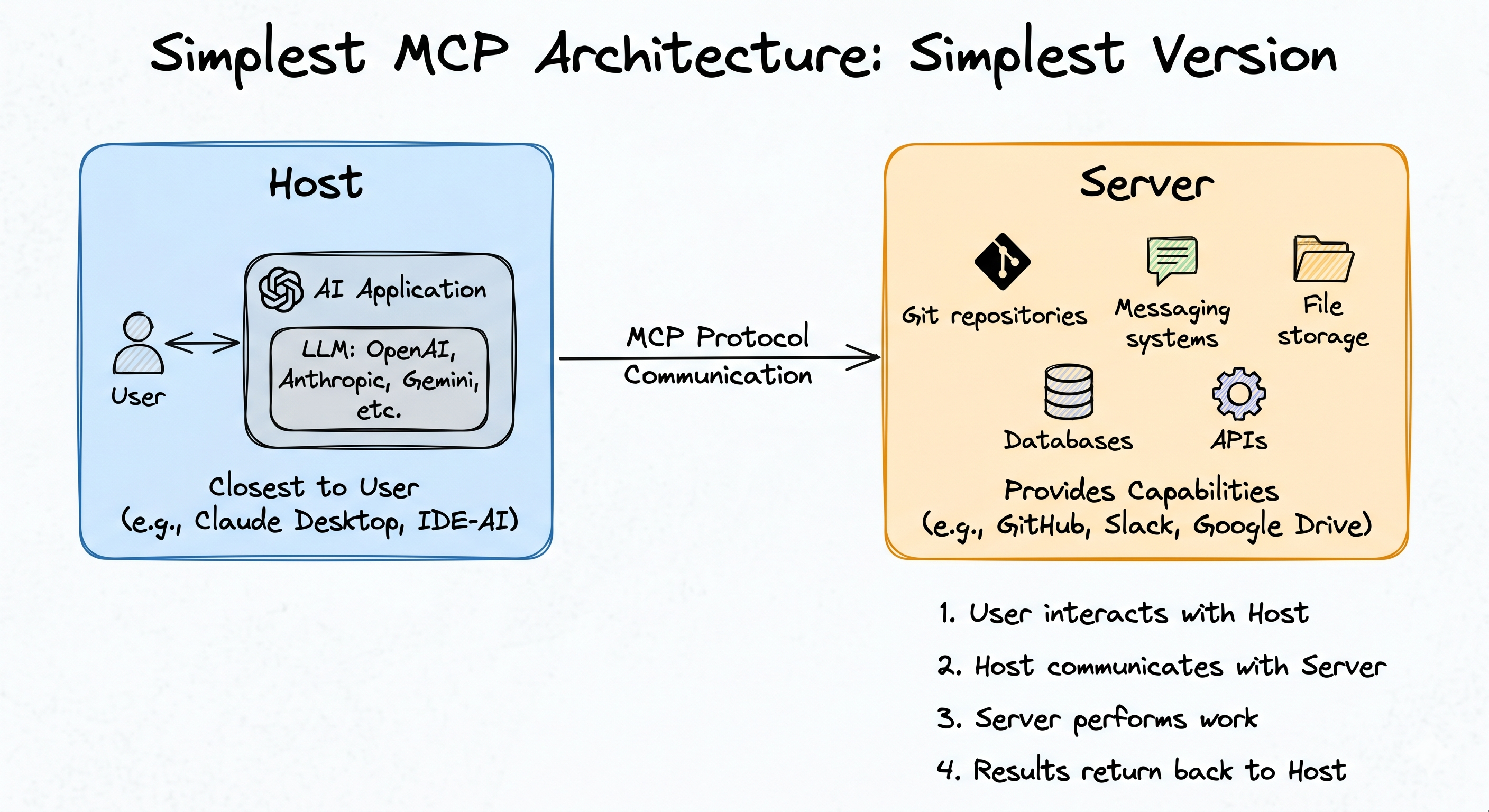
At its most basic level, MCP architecture contains only two entities:
- Host
- Server
This simplified view is useful because it allows us to first understand the broad communication flow before introducing additional components.
What Is the Host?
The Host is essentially the AI application that the user directly interacts with.
You can think of the host as:
- An AI chatbot
- An AI assistant
- An IDE-integrated AI system
- A custom AI application
The host is responsible for receiving user prompts and interacting with the underlying language model.
For example, the host may internally use models from:
- OpenAI
- Anthropic
- Google Gemini
The important thing to understand is that the host is the system sitting closest to the user.
Examples of hosts may include:
- Claude Desktop
- Cursor
- A custom chatbot built by developers
Even though these applications may look different from the outside, conceptually they play the same role inside MCP architecture.
What Is the Server?
The Server is the component that provides capabilities or performs actions. While the host mainly focuses on AI interaction and orchestration, the server is responsible for actually doing useful work.
For example, a server may provide capabilities related to:
- Git repositories
- Messaging systems
- File storage systems
- Databases
- APIs
- External workflows
Some common examples discussed in the transcript include:
- GitHub server
- Slack server
- Google Drive server
Each server specializes in a specific domain and exposes functionality that the AI system can use.
For example:
- A GitHub server may help manage repositories
- A Slack server may help read or send messages
- A Google Drive server may help manipulate files
At this stage, the architecture appears straightforward:
- User interacts with Host
- Host communicates with Server
- Server performs work
- Results return back to Host
However, this simplified architecture is not yet fully accurate.
A Simple MCP Communication Example
Let us understand the basic workflow using an example.
Suppose a user asks:
“Are there any new commits on my GitHub repository?”
The communication flow works roughly like this:
- The user sends the prompt to the Host.
- The Host forwards the prompt to the LLM.
- The LLM realizes the answer is not present in its training data.
- The LLM determines that external information is required.
- The Host identifies an available GitHub server.
- The Host sends a request to the GitHub server.
- The GitHub server checks repository commits.
- The server returns the results.
- The Host passes this information back to the LLM.
- The LLM generates the final response.
- The Host displays the answer to the user.
This gives us the first high-level understanding of how MCP-based systems work.
Why the Simplified Architecture Is Incomplete
Although the previous explanation is useful for learning, real MCP architecture introduces another important component between the Host and the Server.
That component is the MCP Client.
This is where the architecture becomes much more interesting and much more realistic.
Introducing the MCP Client
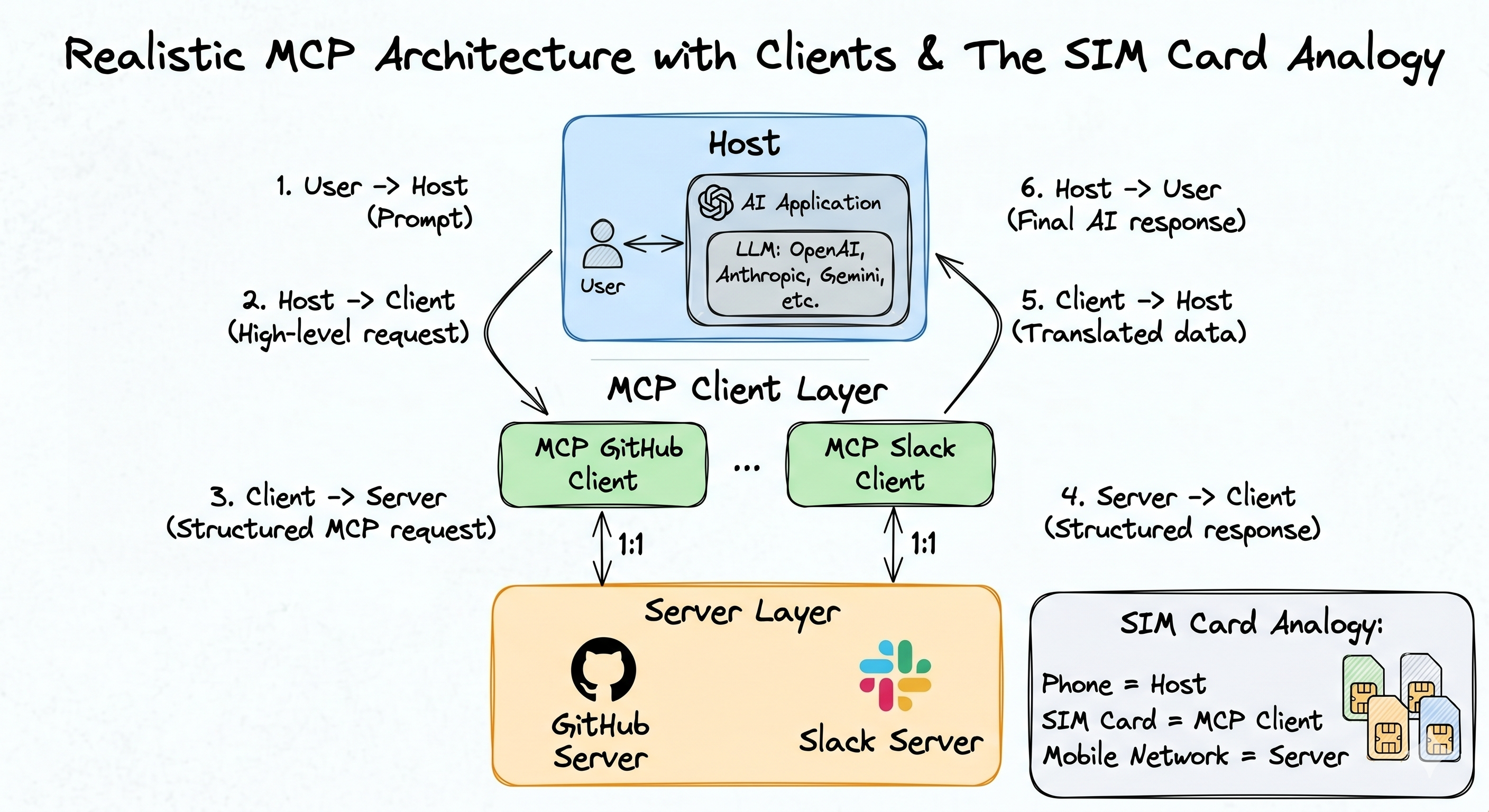
In actual MCP systems, Hosts do not directly communicate with Servers. Instead, all communication happens through an MCP Client.
The Client acts as an intermediary layer whose responsibility is to:
- Understand MCP communication rules
- Translate requests
- Handle structured protocol communication
- Convert responses back into host-understandable form
This is a very important design decision because it separates high-level AI orchestration from low-level protocol communication. The host focuses on AI reasoning, while the client focuses on MCP communication mechanics.
How Communication Changes After Introducing the Client
Let us revisit the earlier GitHub example, but now include the MCP Client. Suppose the user again asks:
“Are there any recent commits in my GitHub repository?”
Now the workflow becomes more structured.
Step 1: User Interacts with Host
The user sends the request to the AI chatbot.
Step 2: Host Generates a High-Level Request
The Host interprets the prompt and generates something conceptually like:
“Find recent commits in the GitHub repository.” This is still a high-level instruction.
Step 3: Request Goes to the MCP Client
The Host sends this instruction to the MCP Client.
Step 4: Client Converts the Request
The Client converts the high-level request into an MCP-compatible structured request. This is one of the client’s most important responsibilities.
Step 5: Structured Request Goes to the Server
The MCP-compatible request is sent to the GitHub server. Because the request follows MCP communication standards, the server can easily understand it.
Step 6: Server Performs the Work
The GitHub server processes the request, fetches commit data, and prepares a structured response.
Step 7: Response Returns to Client
The server returns the response to the MCP Client.
Step 8: Client Translates the Response
The Client converts the structured MCP response into a format that the Host can understand easily.
Step 9: Host Produces Final AI Output
The Host combines this information with the LLM and generates the final response shown to the user.
This layered communication model is what MCP actually follows in practice.
The One-to-One Relationship Between Client and Server
One of the most important architectural rules in MCP is that a Client maintains a one-to-one relationship with a Server.
This means:
- One client communicates with one server
- One server is handled by one dedicated client
This design has major architectural implications.
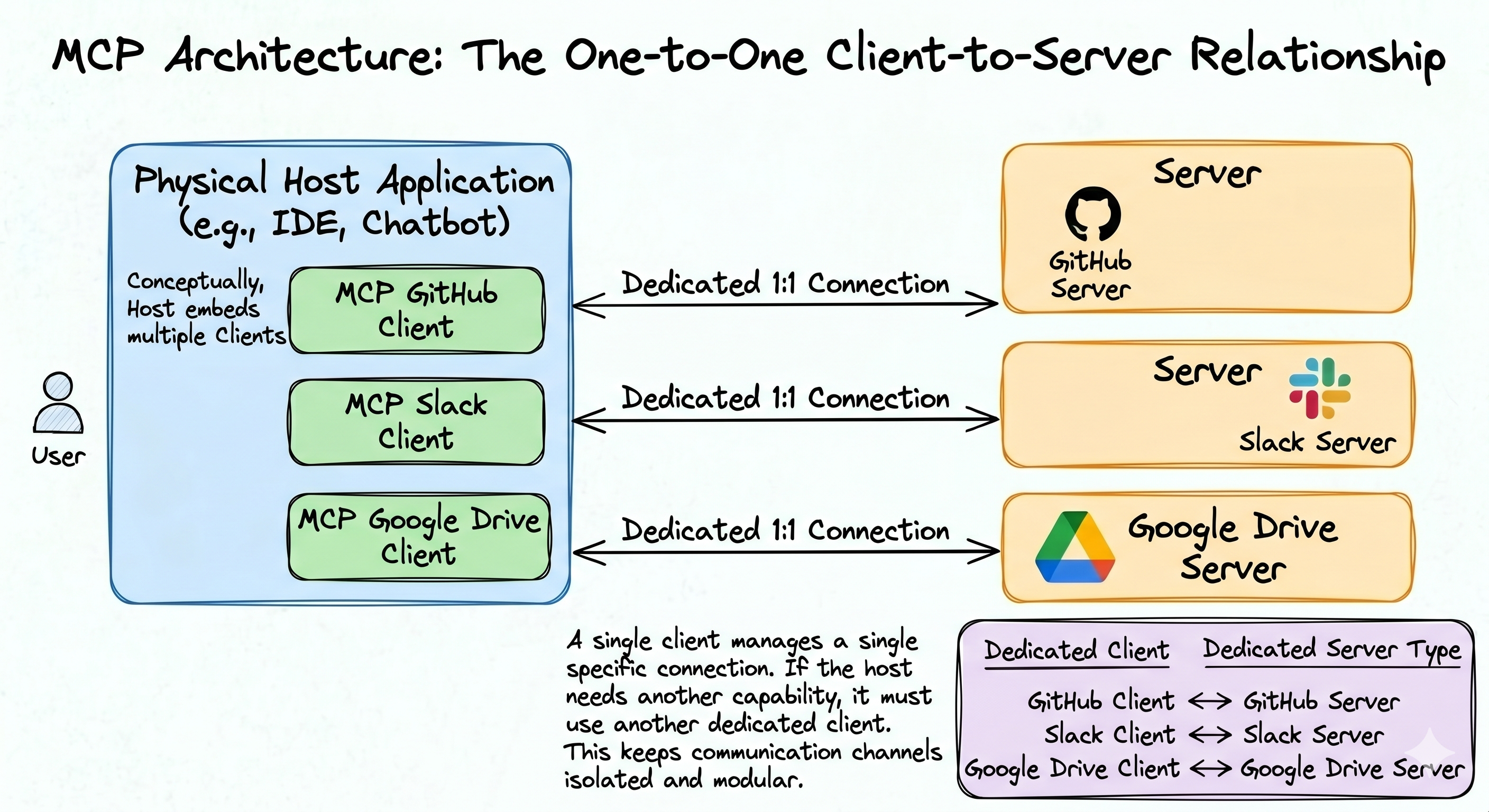
For example:
| Server | Dedicated Client |
|---|---|
| GitHub Server | GitHub Client |
| Slack Server | Slack Client |
| Google Drive Server | Google Drive Client |
If the host wants to communicate with multiple servers, it must use multiple clients. This design keeps communication channels isolated and modular.
Understanding the Architecture Through a SIM Card Analogy
The transcript uses a very effective analogy involving mobile phones. Consider the following mapping:
| Real World | MCP Architecture |
|---|---|
| Phone | Host |
| SIM Card | MCP Client |
| Mobile Network | Server |
Your phone does not directly communicate with the telecom network.
Instead:
- The SIM card enables network communication
- Different SIM cards connect to different networks
- Multiple networks require multiple SIMs
Similarly, in MCP:
- The Host does not directly communicate with Servers
- Clients enable protocol communication
- Each Server requires its own Client
This analogy makes the architecture much easier to visualize.
Benefits of MCP Architecture
The architecture may initially appear more complex than directly calling APIs, but it provides several important benefits.
Decoupling and Separation of Concerns
The first major benefit is decoupling. Each server communication channel operates independently.
For example:
- GitHub communication logic remains isolated
- Slack communication logic remains isolated
- Google Drive communication logic remains isolated
This separation improves:
- Reliability
- Maintainability
- Fault isolation
- Safety
If the GitHub communication pipeline fails, Slack communication may still continue functioning normally. This makes the system significantly more robust.
Parallelism and Scalability
Another major benefit is scalability. Because each server has its own client, tasks can execute independently and in parallel.
For example:
- Slack operations can execute simultaneously with GitHub operations
- Multiple workflows can run concurrently
- Additional servers can be added incrementally
This architecture scales naturally as systems grow. Adding a new server simply means adding another dedicated client.