Understanding Capability Negotiation In MCP
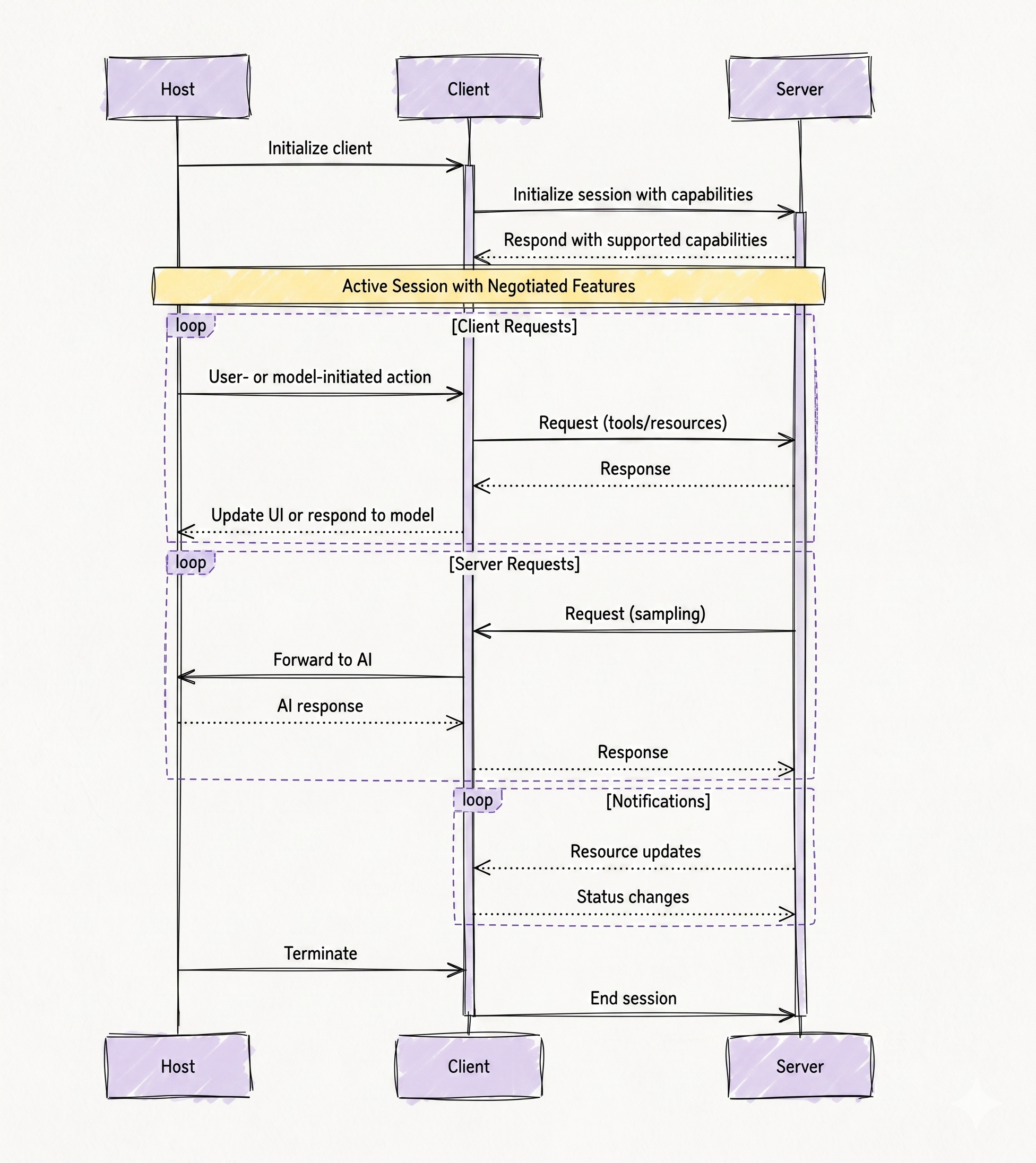
Following diagram represents the lifecycle of communication between three major components in the Model Context Protocol (MCP):
- Host
- Client
- Server
It visually explains how capability negotiation happens during session initialization and how communication continues afterward using the negotiated features. The most important thing to understand is that this diagram is not showing a single request-response operation. Instead, it is showing an entire stateful session lifecycle that begins with initialization, continues with ongoing interactions, and eventually terminates gracefully.
Let us walk through the diagram step by step.
The Three Main Components
Before analyzing the flow, it is important to clearly understand the responsibility of each participant shown in the diagram.
Host
The Host is the top-level AI application or environment that the user interacts with directly.
Examples include:
- AI coding assistants
- Desktop AI applications
- IDE integrations
- Autonomous AI agents
- Workflow orchestration systems
The host is responsible for managing MCP clients and presenting outputs back to users or models. You can think of the host as the “main application layer.”
Client
The Client acts as the communication bridge between the host and a particular MCP server.
The client:
- Establishes the session
- Performs capability negotiation
- Sends protocol requests
- Receives responses
- Maintains session state
One important architectural detail is that each client usually communicates with only one server connection at a time. If a host needs multiple servers, it creates multiple clients.
Server
The Server exposes capabilities such as:
- Tools
- Resources
- Prompts
- Notifications
- Sampling support
The server is essentially the provider of external functionality.
For example:
- A filesystem server exposes file operations
- A database server exposes query operations
- A deployment server exposes infrastructure actions
Phase 1 — Client Initialization
The diagram begins with this flow:
Host → Client : Initialize client
This means the host creates and initializes an MCP client instance.
At this stage:
- No server communication has happened yet
- No capabilities are known yet
- The client is simply being prepared
This step is internal to the host application. For example, an AI IDE may decide:
“I need a filesystem MCP connection.”
So the host creates a dedicated filesystem client.
Phase 2 — Session Initialization with Capabilities
The next flow is:
Client → Server : Initialize session with capabilities
This is the most important part of capability negotiation. Here, the client opens a connection to the server and sends its supported capabilities. The client may advertise features such as:
- Sampling support
- Notification handling
- Progress updates
- Logging support
This step establishes:
- Protocol version compatibility
- Session parameters
- Supported client features
At this moment, the client is essentially saying:
“Here is what I support. Tell me what you support.”
Phase 3 — Server Responds with Supported Capabilities
The server then replies:
Server → Client : Respond with supported capabilities
This completes the negotiation phase. The server advertises features such as:
- Tools
- Resources
- Prompts
- Notifications
- Sampling requests
Now both sides know exactly what operations are valid during the session. This is the core purpose of capability negotiation. Instead of assumptions, both sides establish an explicit agreement.
Active Session with Negotiated Features
After negotiation completes, the diagram shows this highlighted section:
Active Session with Negotiated Features
This is extremely important. From this point onward:
- The session becomes stateful
- Capabilities are remembered
- Communication uses only negotiated features
The session now behaves like an established communication channel rather than isolated API calls. This enables advanced workflows such as:
- Notifications
- Long-running tasks
- Incremental updates
- Real-time collaboration
- Streaming responses
Client Request Loop
The first major loop in the diagram is labeled:
[Client Requests]
This loop represents normal operations initiated by the host, user, or AI model. The flow begins with:
Host → Client : User- or model-initiated action
This means either:
- A user requested something
- Or the AI model decided to perform an action
For example:
- “Open this file”
- “Search logs”
- “Run SQL query”
- “Deploy service”
The client then sends requests to the server:
Client → Server : Request (tools/resources)
This request is allowed only if the capability was negotiated earlier. For example:
- Tool calls require tools capability
- Resource reads require resources capability
The server processes the request and replies:
Server → Client : Response
Finally, the client forwards results back to the host:
Client → Host : Update UI or respond to model
This completes one interaction cycle.
Why This Loop Matters
This loop demonstrates that capability negotiation is not repeated for every request.
Instead:
- Negotiation happens once
- The active session persists
- Requests reuse the negotiated understanding
This improves performance and reduces overhead. Without this approach, every operation would require repeated capability discovery.
Server Request Loop
The next section of the diagram is labeled:
[Server Requests]
This is one of the more advanced MCP concepts. Many people assume communication is always client-driven, but MCP supports bidirectional interaction. That means the server can also initiate requests.
Sampling Requests
Inside this loop, the server sends:
Server → Client : Request (sampling)
This means the server is asking the client to perform AI model inference or sampling. This is extremely important in MCP architecture.
Instead of servers directly invoking AI models themselves, they can delegate model interaction back to the client.
For example:
- A documentation server may ask the client to summarize content
- A planning server may ask the AI to generate deployment steps
- A coding server may request code generation
The client forwards the request to the host or AI system:
Client → Host : Forward to AI
The AI produces a response:
Host → Client : AI response
The client then returns the result to the server:
Client → Server : Response
Why Sampling Requests Are Powerful
This architecture creates an elegant separation of responsibilities. The server:
- Provides domain-specific functionality
The client/host:
- Provides model access
This means servers do not need their own embedded LLM infrastructure. Instead, they can rely on the host’s AI capabilities. This design significantly improves modularity.
Notification Loop
The third loop is labeled:
[Notifications]
This represents asynchronous communication. Unlike normal request-response operations, notifications are event-driven.
The diagram shows examples such as:
Server → Client : Resource updates
and
Server → Client : Status changes
These notifications allow the server to proactively inform the client about changes. Examples include:
- A file changed
- Logs updated
- Deployment completed
- Database schema changed
- Long-running task progressed
This enables real-time reactive systems.
Why Notifications Matter
Without notifications, the client would need constant polling.
For example:
- “Has the file changed yet?”
- “Has deployment completed yet?”
- “Has the task finished yet?”
Polling is inefficient and wasteful. Notifications solve this problem by allowing the server to push updates immediately. This is one reason MCP uses stateful sessions instead of stateless HTTP-style communication.
Session Termination
At the bottom of the diagram, the session eventually ends. The flow is:
Host → Client : Terminate
The host decides to close the session. This could happen because:
- The application shuts down
- The user disconnects
- The task completes
- The server is no longer needed
The client then informs the server:
Client → Server : End session
This allows graceful cleanup. The server may then:
- Release resources
- Close subscriptions
- Save session state
- Stop background work