Model Context Protocol - An Introduction
Modern AI applications are rapidly evolving beyond simple chatbots and text generators. Today’s AI systems are expected to access databases, read files, interact with APIs, communicate with enterprise tools, perform web searches, and even execute workflows across multiple applications. While large language models are extremely powerful, they are still fundamentally limited unless they can securely and efficiently interact with the outside world.
This is where the Model Context Protocol, commonly called MCP, becomes important.
The Model Context Protocol is an open standard designed to connect AI applications with external systems in a consistent and structured way. Instead of building custom integrations for every AI model and every external tool, MCP provides a common protocol that standardizes how these systems communicate with one another.
You can think of MCP as a universal communication layer for AI systems. The official documentation compares it to a USB-C port for AI applications. Just as USB-C provides a standardized way for electronic devices to connect with different peripherals, MCP provides a standardized way for AI applications to connect with tools, databases, workflows, and data sources. The Model Context Protocol (MCP) follows a client-host-server architecture where each host can run multiple client instances.
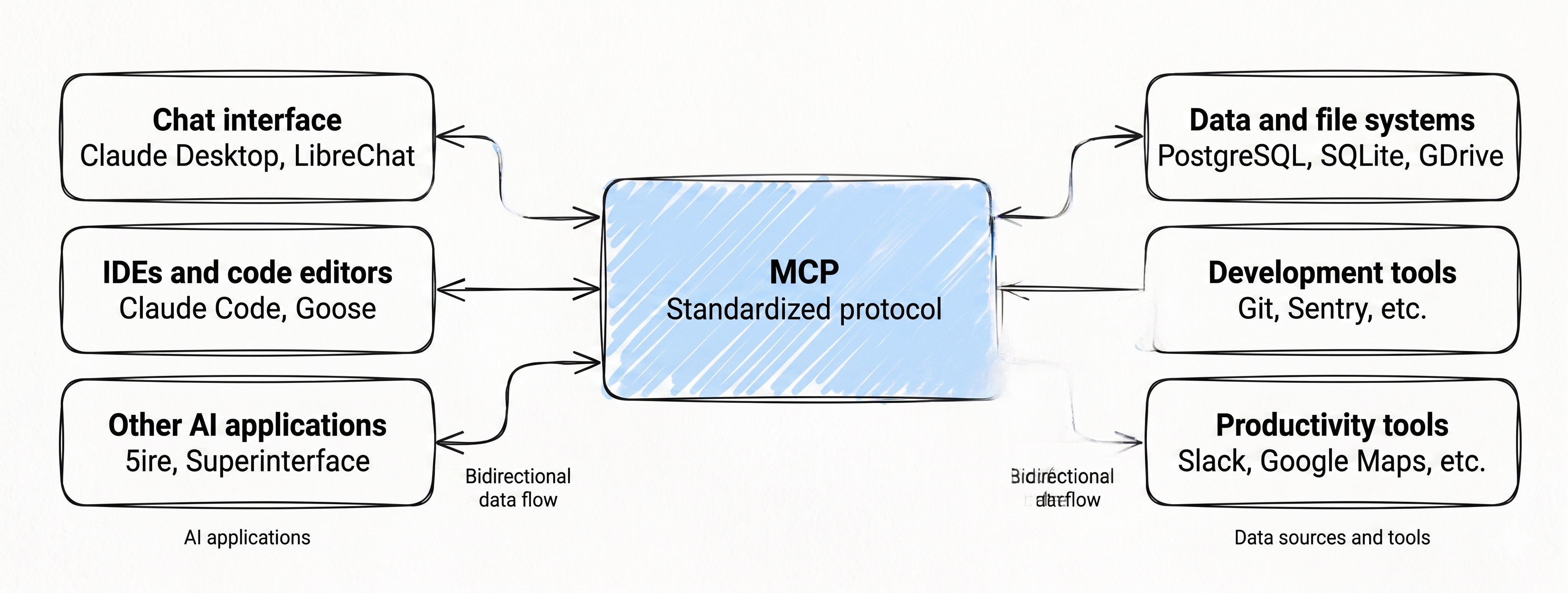
This tutorial explains what MCP is, why it matters, how it works, and why it is becoming one of the most important concepts in modern AI engineering.
Why Traditional AI Integrations Become Difficult
To understand the importance of MCP, it is useful to first understand the problem it attempts to solve.
Large language models are excellent at generating text, summarizing information, reasoning over prompts, and answering questions based on their training data. However, on their own, they cannot directly:
- access your local files
- query live databases
- retrieve real-time information
- interact with APIs
- operate external software
- execute business workflows
Developers usually solve this limitation by manually integrating tools with their AI applications. For example, an AI assistant may require separate integrations for:
- Google Drive
- Slack
- GitHub
- Notion
- PostgreSQL
- Jira
- file systems
- search engines
The problem is that every integration often requires its own custom implementation. As the number of tools and AI applications grows, the complexity increases dramatically.
This issue is often described as the “N × M integration problem.” If there are many AI applications and many external tools, developers end up building large numbers of separate integrations.
MCP solves this by introducing a standardized protocol that both AI applications and external systems can understand.
What Exactly Is MCP?
The Model Context Protocol is an open protocol that enables AI applications to communicate with external systems using a common interface.
Instead of each AI application inventing its own custom method for tool communication, MCP defines a standard approach for:
- sharing context
- exposing tools
- accessing resources
- invoking capabilities
- exchanging structured information
This allows developers to build integrations once and reuse them across multiple AI platforms.
For example, if a developer creates an MCP server for GitHub access, multiple AI clients may potentially use that same integration instead of requiring separate implementations for every AI platform.
This dramatically improves interoperability, portability, and maintainability across AI ecosystems.
Understanding the USB-C Analogy
The USB-C analogy used in the official documentation is actually very helpful for understanding MCP conceptually.
Before USB-C became common, devices required many different cables and connectors:
- HDMI
- VGA
- Lightning
- micro-USB
- proprietary charging ports
This created compatibility problems and unnecessary complexity.
USB-C simplified the ecosystem by creating a universal connection standard.
MCP attempts to do something similar for AI systems.
Instead of every AI tool using a different integration mechanism, MCP creates a shared protocol through which AI applications and external services can communicate consistently.
What MCP Can Enable
One of the reasons MCP is receiving significant attention is because it enables AI systems to become much more capable and context-aware.
The official MCP documentation highlights several examples:
- AI assistants accessing Google Calendar and Notion to behave like personalized assistants
- AI coding systems generating applications from Figma designs
- Enterprise chatbots querying organizational databases
- AI systems interacting with software like Blender and even controlling 3D printing workflows
These examples demonstrate that modern AI systems are moving far beyond isolated text generation. They are increasingly becoming interactive systems capable of reasoning over external information and performing actions in real environments.
Core MCP Architecture
MCP follows a client-server architecture.
At a high level, the ecosystem consists of:
- MCP Hosts
- MCP Clients
- MCP Servers
Understanding these components is important because they define how information flows inside an MCP-based system.
MCP Hosts
The host is usually the AI application itself.
Examples include:
- AI assistants
- IDE integrations
- chat applications
- autonomous agents
- developer tools
Applications such as Claude Desktop, Cursor, and other AI-powered systems can act as MCP hosts. The host is responsible for coordinating interactions with external systems.
The host process acts as the container and coordinator:
- Creates and manages multiple client instances
- Controls client connection permissions and lifecycle
- Enforces security policies and consent requirements
- Handles user authorization decisions
- Coordinates AI/LLM integration and sampling
- Manages context aggregation across clients
MCP Clients
The MCP client acts as the communication layer inside the host application.
Each client is created by the host and maintains an isolated server connection:
- Establishes one stateful session per server
- Handles protocol negotiation and capability exchange
- Routes protocol messages bidirectionally
- Manages subscriptions and notifications
- Maintains security boundaries between servers A host application creates and manages multiple clients, with each client having a 1:1 relationship with a particular server.
The client essentially acts as the bridge between the AI application and external MCP servers.
MCP Servers
MCP servers expose capabilities to AI applications.
These capabilities may include:
- file access
- database queries
- web search
- GitHub operations
- Slack communication
- calendar management
- custom business logic
Servers provide specialized context and capabilities:
- Expose resources, tools and prompts via MCP primitives
- Operate independently with focused responsibilities
- Request sampling through client interfaces
- Must respect security constraints
- Can be local processes or remote services
An MCP server is essentially a specialized service that exposes resources and tools using the MCP standard.
For example:
- a filesystem MCP server may expose local files
- a GitHub MCP server may expose repository operations
- a database MCP server may expose query capabilities
Because all of these servers use a common protocol, AI applications can interact with them in a standardized manner.
Core MCP Concepts
The MCP ecosystem revolves around several important concepts that define how AI applications interact with external systems.
Resources
Resources are structured pieces of information that can be read by AI applications.
Examples include:
- file contents
- API responses
- database records
- logs
- configuration data
Resources are generally treated as readable contextual data that helps the AI system understand the environment or complete tasks.
Tools
Tools are executable functions that the AI model can invoke.
Examples include:
- performing a web search
- querying a database
- sending an email
- creating a GitHub issue
- generating a report
Tools are one of the most important parts of MCP because they allow AI systems to move from passive text generation into active task execution.
Prompts
MCP also supports reusable prompt templates.
These prompts help standardize interactions and workflows for users and applications.
For example, an enterprise system may expose specialized prompts for:
- incident analysis
- code review
- financial reporting
- document summarization
This allows organizations to package domain-specific AI workflows in reusable formats.
Why MCP Matters
MCP is important because it simplifies AI integration at scale.
Without MCP, developers often build tightly coupled integrations that are difficult to maintain and reuse. MCP introduces standardization, which improves:
- interoperability
- scalability
- maintainability
- portability
- ecosystem growth
The benefits affect multiple groups differently.
Benefits for Developers
For developers, MCP reduces the complexity of integrating AI systems with external services. Instead of writing custom integrations repeatedly, developers can rely on a standardized protocol.
This allows teams to focus more on application logic and less on integration plumbing.
Benefits for AI Applications
AI systems become significantly more capable when they can access external tools and contextual data.
MCP enables AI applications to:
- retrieve live information
- interact with enterprise systems
- execute workflows
- maintain contextual awareness
This results in more intelligent and useful AI experiences.
Benefits for End Users
For end users, MCP enables AI systems that can actually perform meaningful actions instead of only generating text responses.
An MCP-enabled assistant may:
- schedule meetings
- analyze business data
- retrieve documents
- automate workflows
- coordinate tasks across applications
This creates a much more practical and powerful user experience.
Broad Ecosystem Support
One major reason MCP is gaining momentum is its growing ecosystem support.
The protocol is supported by multiple AI tools and development platforms, including:
- Claude
- ChatGPT integrations
- Visual Studio Code tools
- Cursor
- Claude Desktop
- various SDKs and AI frameworks
The official MCP project also provides SDKs for many programming languages, including:
- Python
- TypeScript
- Java
- Kotlin
- C#
- Go
- Ruby
- Rust
- Swift
This broad language support makes MCP accessible to a wide range of developers and organizations.
Security and Authorization in MCP
Because MCP servers may expose sensitive resources, security becomes extremely important.
The MCP ecosystem supports standardized authorization approaches, including OAuth-based mechanisms for secure access control.
Authorization becomes especially important when servers expose:
- emails
- enterprise databases
- private documents
- administrative operations
- user-specific data
MCP is designed to support secure and controlled interactions rather than unrestricted access.