Model Context Protocol - Architecture Overview
Scope of the Model Context Protocol
The Model Context Protocol (MCP) ecosystem is made up of several important projects that together provide the standards, libraries, tools, and example implementations required for building MCP-compatible systems.
The major components included within the MCP ecosystem are:
-
MCP Specification
The MCP Specification defines the official rules and implementation requirements for MCP clients and servers. It describes how communication should happen between different MCP components and acts as the foundation of the entire protocol.
-
MCP SDKs
MCP provides SDKs for multiple programming languages so that developers can easily build MCP-compatible applications without implementing the protocol completely from scratch. These SDKs simplify both client-side and server-side development.
-
MCP Development Tools
The ecosystem also includes various development and debugging tools that help developers create, test, and inspect MCP-based applications more efficiently. One important example is the MCP Inspector, which is used for inspecting communication between MCP clients and servers.
-
MCP Reference Server Implementations
MCP includes reference implementations of servers that demonstrate how MCP servers should be designed and implemented in real-world scenarios. These examples help developers understand best practices and accelerate the development process.
Concepts of MCP
Participants
The Model Context Protocol (MCP) is built around a client-server architecture, where an AI application communicates with one or more MCP servers in a structured and standardized manner. In this architecture, the AI application itself acts as the central coordinator and is commonly referred to as the MCP host. Applications such as Visual Studio Code, Claude Code, or Claude Desktop are examples of systems that can function as MCP hosts.
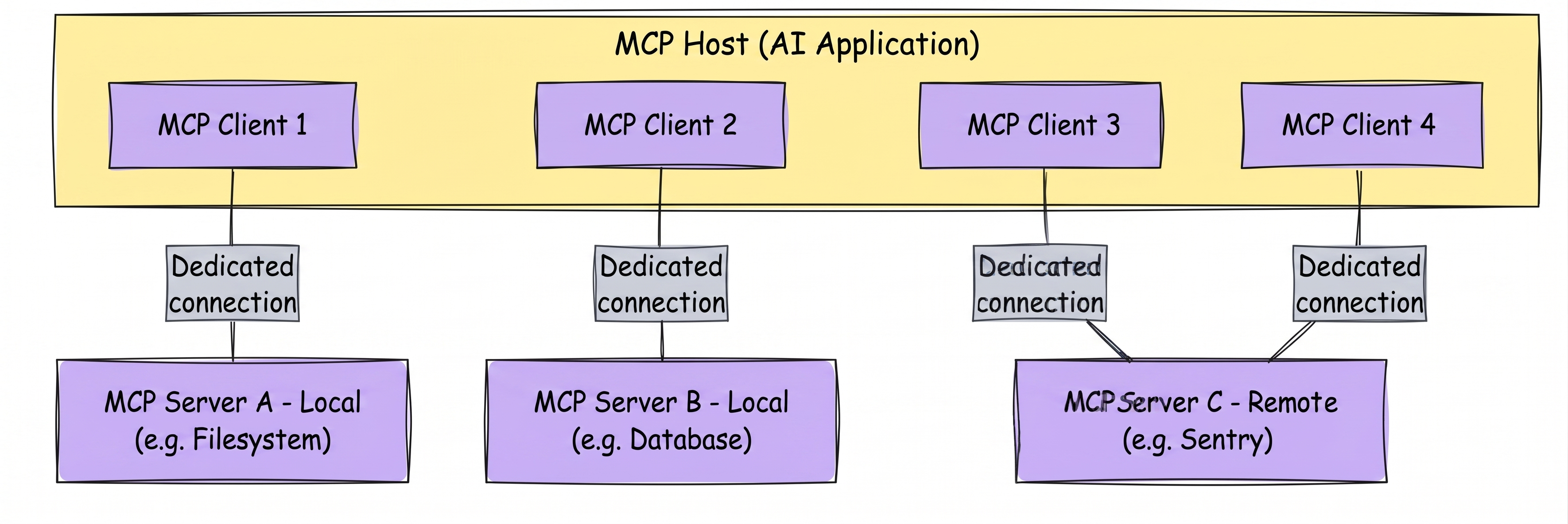
The MCP host establishes connections with MCP servers by creating dedicated MCP clients internally. In other words, every time the host connects to a new MCP server, it creates a separate MCP client instance responsible for maintaining communication with that specific server. This design allows the host to interact with multiple MCP servers simultaneously while keeping each connection isolated and independently managed.
Another important aspect of MCP architecture is the transport mechanism used for communication. Local MCP servers commonly use the STDIO transport and are generally designed to serve a single MCP client at a time. On the other hand, remote MCP servers usually rely on Streamable HTTP transport, which allows them to serve multiple MCP clients concurrently across different systems and environments.
The MCP architecture mainly consists of the following participants:
- MCP Host: The MCP host is the primary AI application responsible for coordinating the overall MCP workflow and managing connections to one or more MCP servers. It acts as the central controller that creates and supervises multiple MCP clients whenever connections to external servers are required.
- MCP Client: An MCP client is a component created by the MCP host for establishing and maintaining communication with a specific MCP server. Its primary responsibility is to fetch context, resources, tools, or other relevant information from the server and make that information available to the MCP host for further processing.
- MCP Server: The MCP server is the program responsible for exposing context and capabilities to MCP clients. Depending on the implementation, an MCP server may provide access to filesystems, APIs, databases, enterprise systems, monitoring platforms, or other external resources that an AI application may need to interact with.
To understand this architecture more clearly, consider the example of Visual Studio Code acting as an MCP host. Suppose Visual Studio Code establishes a connection to the Sentry MCP server. In this situation, the Visual Studio Code runtime internally creates an MCP client object specifically responsible for maintaining communication with the Sentry MCP server. Later, if Visual Studio Code also connects to another MCP server, such as a local filesystem server, the runtime creates an additional MCP client object dedicated to managing that separate connection. This means that every MCP server connection is handled independently through its own MCP client.
It is also important to understand that the term “MCP server” refers to the logical server program that provides context data, regardless of where the server is physically running. An MCP server may execute either locally on the same machine as the AI application or remotely on an external platform.
For example, when Claude Desktop launches a filesystem MCP server using the STDIO transport, the server executes locally on the user’s machine. This type of deployment is commonly referred to as a local MCP server because both the host and server exist within the same environment.
In contrast, some MCP servers operate remotely over the network. A good example is the official Sentry MCP server, which runs on the Sentry platform and communicates using the Streamable HTTP transport mechanism. Since the server is hosted externally and accessed through network communication, it is commonly referred to as a remote MCP server.
This flexible architecture is one of the key reasons MCP is becoming increasingly important in modern AI systems, because it allows AI applications to seamlessly connect with multiple external tools and context providers using a consistent communication model.
Understanding the Layers of MCP
When working with MCP (Model Context Protocol), it is important to understand that the architecture is divided into two distinct layers. These layers separate the logical communication model from the actual networking and transport mechanisms, which makes the protocol cleaner, more modular, and easier to extend.
At a high level, MCP is designed so that the internal communication rules remain independent from the underlying transport technology being used. This separation allows developers to focus on protocol behavior without tightly coupling it to a specific communication channel such as WebSockets, HTTP, or another transport mechanism.
MCP consists of the following two layers:
- Data Layer
- Transport Layer
Although both layers work together to enable communication between MCP clients and servers, each layer has a very specific responsibility.
The Data Layer
The Data Layer is the core logical layer of MCP. It defines how clients and servers communicate with each other using a structured protocol built on JSON-RPC.
This layer is responsible for defining:
- The communication rules between the client and the server
- The lifecycle of connections and interactions
- The structure of requests and responses
- The primitives used inside the protocol, such as tools, resources, prompts, and notifications
In simpler terms, the Data Layer defines what information is exchanged and how that information should behave logically.
At its core, the Data Layer implements a communication protocol based on JSON-RPC 2.0. This protocol standardizes how requests, responses, notifications, and interactions are exchanged so that different systems can communicate in a predictable and interoperable manner. The Data Layer is responsible for much more than simply sending JSON messages. It defines the lifecycle of communication, the capabilities exposed by servers, the features available to clients, and several utility mechanisms that make the protocol practical for real-world AI applications.
The major areas of the Data Layer include:
-
Lifecycle Management: One of the primary responsibilities of the Data Layer is lifecycle management. Lifecycle management refers to the complete sequence of events that occur from the moment a client connects to a server until the communication session ends. This includes:
- Connection initialization
- Capability negotiation
- Connection termination
MCP is a stateful protocol that requires lifecycle management. The purpose of lifecycle management is to negotiate the capabilities that both client and server support.
These steps ensure that both the client and server understand each other’s capabilities and can communicate safely and efficiently.
-
Server Features: The Data Layer also defines several server-side capabilities that allow servers to provide meaningful functionality to clients. These server features are some of the most important aspects of MCP because they expose the actual capabilities that AI systems and applications use during interactions. The major server features include:
- Tools
- Resources
- Prompts
-
Client Features: Interestingly, the Data Layer is not limited to server-driven functionality. MCP also allows servers to interact with clients in meaningful ways through client features. These capabilities allow the server to request services or actions from the client itself. The major client features include:
- LLM sampling
- User input elicitation
- Client-side logging
-
Utility Features: In addition to core functionality, the Data Layer also provides several utility features that improve usability and operational behavior. These utility features help make MCP more practical for real-world applications where interactions may be asynchronous, long-running, or event-driven. Two important utility capabilities are:
- Notifications
- Progress tracking
Each of these areas plays a specific role in enabling reliable and structured communication inside MCP.
The Transport Layer
The Transport Layer is responsible for the actual communication channel used to exchange data between the client and server.
While the Data Layer defines the logical structure of communication, the Transport Layer defines how those messages physically move between systems.
This layer handles:
- Communication mechanisms
- Connection establishment
- Message framing
- Authorization
- Transport-specific behaviors
In simpler terms, the Transport Layer focuses on the networking and delivery aspects of MCP communication.
Data Layer Protocol - primitives
MCP primitives are one of the most fundamental concepts in the Model Context Protocol (MCP). They define the actual capabilities that clients and servers can expose to one another and form the foundation of how contextual information and executable functionality are shared inside the MCP ecosystem.
Without primitives, MCP would simply be a messaging protocol. Primitives are what give the protocol meaning and practical usefulness because they define:
- What kinds of information can be exchanged
- What kinds of actions can be performed
- How AI applications interact with external systems
- How clients and servers collaborate dynamically
In simpler terms, primitives are the building blocks of interaction within MCP.
They allow AI applications to move beyond isolated prompt-response behavior and instead participate in structured, tool-driven, context-aware workflows.
What Are MCP Primitives?
MCP primitives define the types of capabilities that can be exposed by either:
- MCP servers
- MCP clients
- Cross-cutting utility systems
These primitives standardize how functionality is described, discovered, accessed, and executed.
For example, instead of every server inventing its own custom API structure for tools or resources, MCP provides a consistent primitive model that all compliant implementations can follow.
This standardization makes it possible for AI systems to interact with completely different servers in a predictable and reusable way.
Why Primitives Matter
Primitives are extremely important because they define the actual operational surface area of MCP.
They determine:
- What contextual information AI applications can access
- What actions AI systems can perform
- How reusable workflows are structured
- How clients and servers communicate capabilities dynamically
This creates a much more modular and extensible architecture compared to traditional tightly coupled integrations.
For example:
- One server may expose database tools
- Another server may expose filesystem resources
- Another may provide prompt templates for AI workflows
An MCP-compatible client can discover and interact with all of them using the same protocol concepts.
Core Server Primitives
MCP defines three primary primitives that servers can expose:
- Tools
- Resources
- Prompts
These primitives represent the core functionality available to AI applications.
Tools
Tools are executable functions that AI applications can invoke to perform actions. You can think of tools as operations or capabilities exposed by the server that allow the AI system to interact with external systems, process data, or execute workflows.
Tools are action-oriented primitives. Some common examples include:
- File operations
- API calls
- Database queries
- Code execution
- Search operations
- Workflow automation
For example, an MCP server may expose tools such as:
- queryDatabase
- readFile
- sendEmail
- generateReport
The AI application can invoke these tools dynamically whenever they are needed during an interaction. This is one of the most powerful aspects of MCP because it allows language models to interact with real systems instead of being limited to static text generation.
How Tools Work
Each tool typically includes:
- A name
- A description
- Input parameters
- Expected output structure
The client first discovers available tools using discovery methods and can later execute them using dedicated execution methods.
For example:
tools/list→ discovers available toolstools/call→ executes a specific tool
This separation between discovery and execution creates a flexible and dynamic system where available capabilities can change over time.
Resources
Resources are data-oriented primitives that provide contextual information to AI applications. Unlike tools, which perform actions, resources primarily expose information and state. Resources may include:
- File contents
- Database records
- API responses
- Configuration data
- Knowledge documents
- Application state
Resources help AI systems gain access to external context that improves reasoning and decision-making. For example, an AI assistant may retrieve:
- A project documentation file
- A customer record
- A JSON configuration
- A schema definition
before generating a response or deciding which tool to execute.
Why Resources Are Important
Modern AI applications often require external context to produce accurate and useful outputs.
Without resources, the model would only rely on:
- The current conversation
- Pretrained knowledge
- Static prompts
Resources allow MCP systems to inject live, dynamic, and application-specific data into AI workflows.
This dramatically improves:
- Accuracy
- Relevance
- Context awareness
- Workflow orchestration
Prompts
Prompts are reusable templates that help structure interactions with language models. Instead of constructing prompts manually every time, MCP servers can expose predefined prompt templates that clients can reuse consistently. These prompts may include:
- System prompts
- Few-shot examples
- Instruction templates
- Workflow guidance
For example, a prompt may define:
- How database queries should be phrased
- How tool outputs should be interpreted
- How AI responses should be formatted
This makes AI behavior more reliable and standardized across applications.
Benefits of Prompt Primitives
Prompt primitives provide several important advantages:
- Reusable AI interaction patterns
- More consistent model behavior
- Centralized prompt management
- Easier workflow orchestration
- Reduced prompt duplication
Prompt templates become especially valuable in large systems where many clients interact with the same server capabilities.
Primitive Discovery and Retrieval
Each primitive type includes associated methods for discovery and retrieval. MCP standardizes these interactions using method naming patterns such as:
*/list*/gettools/call
These methods allow clients to dynamically discover available capabilities instead of relying on hardcoded assumptions.
Discovery Using */list Methods
The */list methods are used to discover available primitives.
For example:
tools/listresources/listprompts/list
An MCP client typically begins by listing available primitives before attempting to use them.
For example, a client may:
- Request
tools/list - Receive available tool definitions
- Choose an appropriate tool
- Execute it using
tools/call
This discovery-first approach allows MCP systems to remain highly dynamic and extensible. New capabilities can appear or disappear without requiring client-side code changes.
Retrieval Using */get Methods
The */get methods are used to retrieve detailed information or content associated with a primitive.
For example:
- Retrieving a specific resource
- Fetching a prompt template
- Obtaining additional metadata
This allows clients to selectively access only the information they actually need.
Tool Execution Using tools/call
Unlike resources and prompts, tools are executable primitives.
MCP therefore provides a dedicated execution method:
tools/call
This method allows clients to invoke a tool with specific parameters and receive execution results.
For example, a client may:
- Call a database query tool
- Pass a SQL query as input
- Receive structured query results
This creates a standardized mechanism for AI-driven action execution.
Example: MCP Server for a Database
To better understand how primitives work together, consider an MCP server that provides access to a database. This server may expose:
Tools
The server may provide tools such as:
- Execute SQL queries
- Retrieve records
- Update database entries
These tools allow AI applications to interact directly with the database.
Resources
The server may also expose resources containing:
- Database schemas
- Table definitions
- Relationship mappings
- Metadata
These resources help the AI understand the database structure before performing actions.
Prompts
The server may additionally expose prompts containing:
- Few-shot query examples
- SQL formatting instructions
- Query optimization guidance
These prompts help improve the quality and consistency of AI-generated interactions with the database.
Together, these primitives create a complete and context-aware AI integration layer.
Client Primitives
MCP does not only define primitives for servers. It also defines primitives that clients can expose. These client primitives enable richer and more interactive workflows between clients and servers.
The major client primitives include:
- Sampling
- Elicitation
- Logging
Sampling
Sampling allows servers to request language model completions from the client’s AI application. This is especially useful when the server itself does not want to depend directly on a specific language model SDK.
Instead of embedding model-specific logic, the server can remain model-independent and delegate AI generation to the client.
The server uses:
sampling/createMessage
to request a language model completion.
Sampling creates several advantages:
- Model independence
- Reduced server complexity
- Better portability
- Easier integration with multiple AI providers
For example, the same MCP server could work with:
- OpenAI models
- Anthropic models
- Local LLMs
- Enterprise AI systems
without changing server implementation details.
Elicitation
Elicitation allows servers to request additional information from users through the client.
This becomes useful when:
- Required information is missing
- User confirmation is needed
- Interactive workflows are being executed
- Additional clarification is required
The server uses:
elicitation/create
to request user input dynamically.
Suppose an AI assistant wants to delete a production database record. Instead of immediately executing the action, the server may request:
- User confirmation
- Additional parameters
- Security verification
This creates safer and more interactive workflows.
Logging
Logging enables servers to send log messages to clients for debugging, monitoring, and operational visibility.
These logs may include:
- Informational messages
- Warnings
- Errors
- Progress details
- Diagnostic events
Logging becomes especially important in long-running workflows where visibility into execution state improves usability and troubleshooting.