Understanding LangGraph: Why It Exists and How It Extends LangChain
Introduction
Over the last few years, Large Language Models (LLMs) have transformed the way software applications are built. Initially, most developers were interested in simple use cases such as chatbots, content generation tools, and question-answering systems. These applications typically involved taking a user query, sending it to an LLM, and displaying the generated response.
As organizations started adopting AI in more serious business scenarios, the complexity of these applications increased dramatically. Instead of asking an LLM to answer a single question, developers wanted systems that could perform multiple tasks, make decisions, use external tools, remember information, and execute long-running workflows.
This evolution created a new challenge. While existing frameworks such as LangChain were excellent for building traditional LLM applications, developers began encountering situations where simple chains were no longer sufficient. Workflows became larger, execution paths became dynamic, and maintaining application state became increasingly difficult.
To solve these problems, the LangChain team introduced LangGraph.
In this tutorial, we will first revisit what LangChain provides, understand where its limitations begin to appear, and then explore how LangGraph addresses those limitations through a graph-based architecture.
Revisiting LangChain
Before understanding LangGraph, it is important to understand the role that LangChain plays in the AI ecosystem.
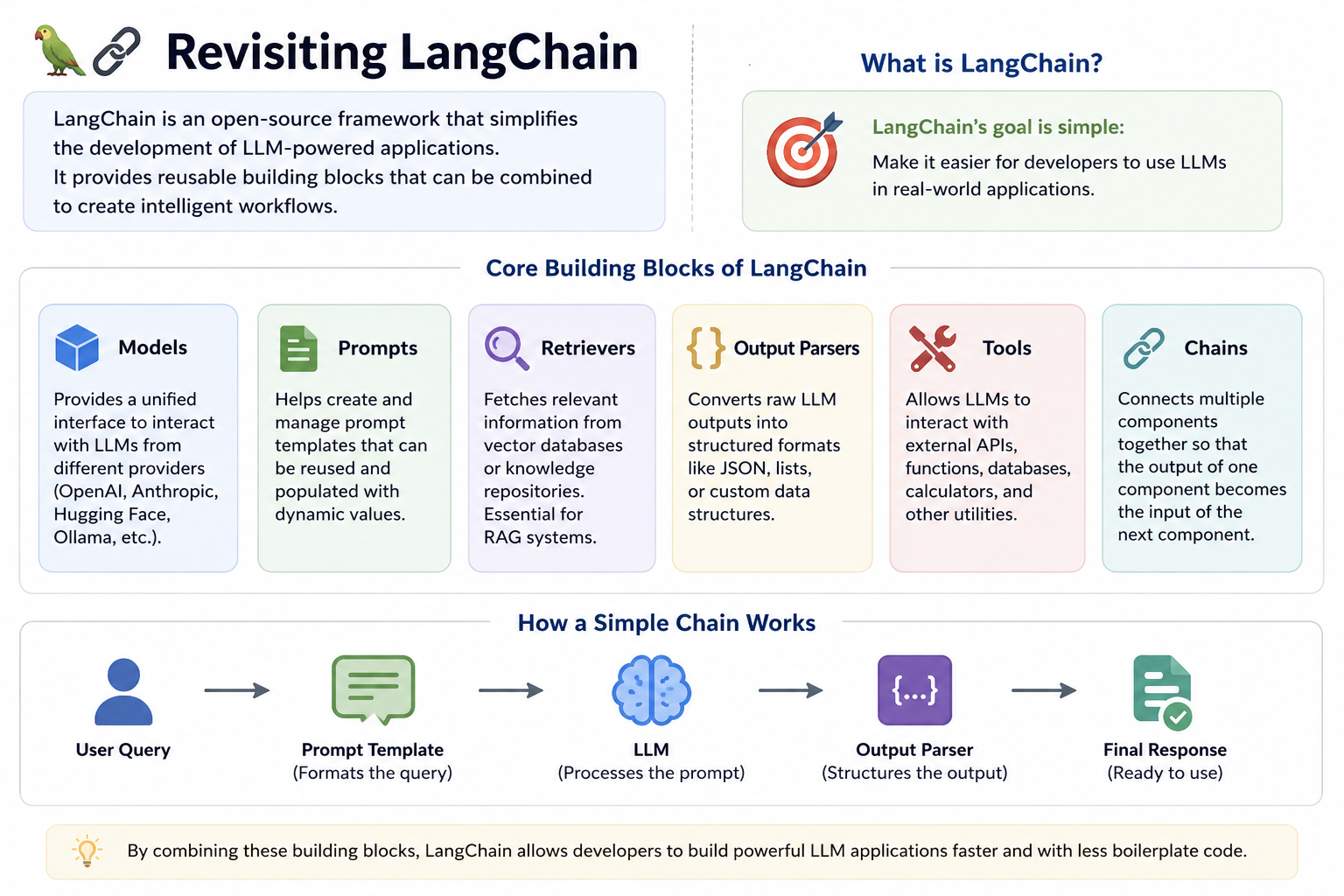
LangChain is an open-source framework designed to simplify the development of LLM-powered applications. Instead of manually integrating prompts, models, retrievers, parsers, and tools, developers can use LangChain's abstractions to create applications more efficiently.
The framework provides several reusable building blocks.
The first building block is the model abstraction. This abstraction allows developers to communicate with different LLM providers through a unified interface. Whether the underlying model comes from OpenAI, Anthropic, Hugging Face, or Ollama, the interaction pattern remains largely consistent.
Another important building block is prompt management. Since prompts play a critical role in determining the quality of LLM outputs, LangChain provides prompt templates that make prompts easier to create, maintain, and reuse.
LangChain also includes retrievers, which are responsible for fetching relevant information from vector databases and knowledge repositories. These retrievers form the foundation of Retrieval-Augmented Generation (RAG) systems.
Perhaps the most famous feature of LangChain is its support for chains.
The idea behind a chain is remarkably simple. The output of one component automatically becomes the input of another component. By connecting multiple components together, developers can build workflows without manually moving data between steps.
For example, a workflow might take a user query, pass it through a prompt template, send the resulting prompt to an LLM, and finally use an output parser to structure the response.
Conceptually, the workflow looks like this:
User Query → Prompt Template → LLM → Output Parser → Response
This simple abstraction makes many AI applications surprisingly easy to build.
What Kind of Applications Can LangChain Build?
Using chains and other LangChain components, developers can build a wide variety of applications.
A customer support chatbot is a common example. The user asks a question, the question is sent to an LLM, and the generated response is returned.
Another example is document summarization. A document is passed to an LLM, and the generated summary is presented to the user.
Similarly, a RAG application can retrieve relevant information from company documents before sending both the query and retrieved context to the model.
LangChain can also support basic agent-like behavior through tool calling. An LLM can decide whether it needs to invoke a weather API, a calculator, a database query, or another external tool before generating a response. For many real-world projects, these capabilities are more than enough. However, problems begin to emerge when workflows become more sophisticated.
A More Complex Scenario
Imagine that we want to build an AI-powered travel planning system.
A user provides the following request:
Plan a 7-day vacation to Japan with a budget of ₹2,00,000.
At first glance, this appears to be a straightforward task. However, if we think carefully about everything the system must do, the workflow becomes surprisingly complex.
The system might first generate a draft itinerary.
Once the itinerary is generated, it may ask the user whether they approve the proposed destinations.
If the user rejects the itinerary, the system must modify it and generate a new version.
After approval, the system may search for flights.
If suitable flights are not available within budget, it may need to adjust the itinerary and search again.
After flights are finalized, the system might search for hotels.
If hotel costs exceed the budget, it may need to revisit previous decisions and make modifications.
Finally, after all reservations are completed, the system generates a detailed travel plan.
Notice something interesting.
This workflow is no longer a straight line.
There are decision points, loops, retries, and multiple possible execution paths.
This is exactly where traditional chains begin to struggle.
The Control Flow Problem
One of the biggest limitations of traditional chains is that they are naturally linear.
A chain is designed to execute steps in a predetermined sequence.
For example:
Step A → Step B → Step C → Step D
This works perfectly for simple workflows.
The travel planning system, however, behaves differently.
Sometimes the user approves the itinerary.
Sometimes the user rejects it.
Sometimes flights are available.
Sometimes they are not.
Sometimes the system must revisit previous decisions.
In other words, the workflow contains branches.
A branch allows execution to move in different directions depending on runtime conditions.
The workflow also contains loops.
For example, the itinerary generation step may execute multiple times until the user is satisfied.
Furthermore, the workflow may require jumps between distant parts of the process.
These behaviors are difficult to represent using simple chains.
As a result, developers often start writing large amounts of custom Python code containing if-else statements, loops, and orchestration logic.
This additional code is commonly called glue code because its primary purpose is to connect workflow pieces together.
Initially, a small amount of glue code may not seem problematic. However, as workflows grow larger, the amount of glue code grows rapidly. Eventually, maintaining the orchestration logic becomes more difficult than implementing the actual AI functionality.
This challenge was one of the primary motivations behind the creation of LangGraph.
Thinking in Graphs Instead of Chains
LangGraph approaches the problem from a completely different perspective.
Instead of representing a workflow as a sequence of steps, it represents the workflow as a graph.
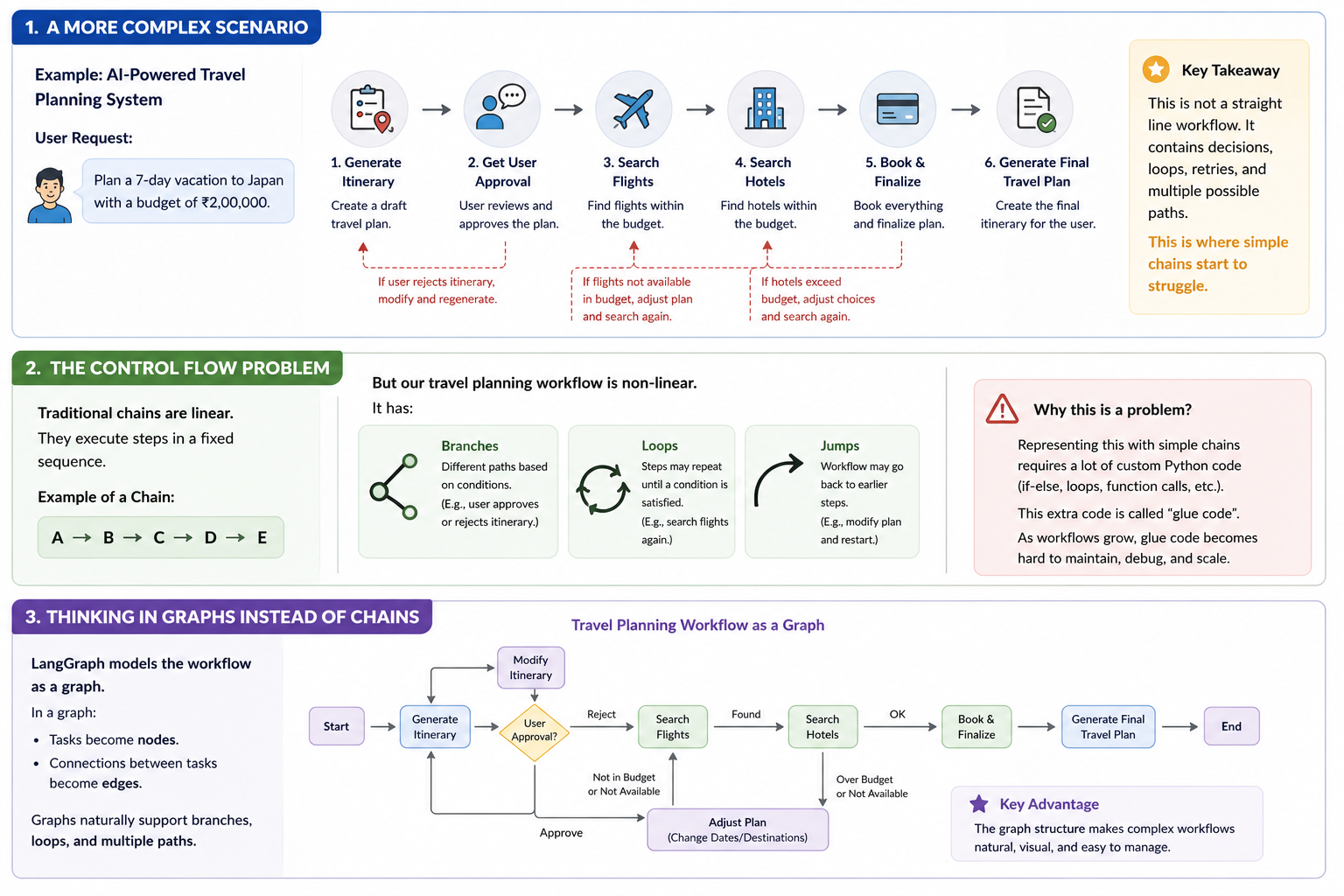
In graph terminology, each task becomes a node.
The connections between tasks become edges.
For our travel planning system, the graph might contain nodes such as:
- Generate Itinerary
- Validate Budget
- Search Flights
- Search Hotels
- Request User Approval
- Finalize Plan
The edges define how execution moves between these nodes.
The beauty of this approach is that graphs naturally support branching and looping.
A node can have multiple outgoing paths.
A node can point back to an earlier node.
A node can participate in a cycle.
These capabilities are built into graph theory itself, which makes LangGraph an excellent fit for complex workflows.
Instead of forcing developers to manually manage execution logic, the graph structure becomes the execution logic.
Understanding State in AI Workflows
Control flow is only one part of the challenge. The second major challenge is state management.
To understand state, think again about our travel planning application. As the workflow executes, various pieces of information are produced and updated.
The system needs to remember:
- The user's budget
- The current itinerary
- Approved destinations
- Flight details
- Hotel selections
- Remaining budget
- Booking status
These values continuously evolve throughout the workflow. At the beginning of execution, flight information may not exist. Later, flight information becomes available. After modifications, the selected flight may change again. The collection of all these values represents the state of the workflow.
Without state, the system cannot understand what has already happened or what should happen next.
Why State Management Becomes Difficult in LangChain
In simple workflows, state management is relatively easy. However, as workflows become larger, the amount of state grows significantly. Developers often find themselves maintaining dictionaries, global variables, database records, and custom objects to track workflow progress.
The challenge is not merely storing the data. The real challenge is ensuring that every step can access the correct version of the data while simultaneously updating it when necessary. When dozens of workflow steps are involved, manually passing state between components becomes cumbersome and error-prone.
This is another area where LangGraph introduces significant improvements.
How LangGraph Handles State
LangGraph treats state as a first-class concept. When creating a graph, developers define a state object that contains all workflow-related information.
Every node in the graph can access this shared state.
- A node can read values from the state.
- A node can modify values in the state.
- A node can add new information to the state.
As execution progresses through the graph, the state evolves naturally alongside the workflow. This design dramatically reduces the amount of manual state-management code that developers need to write. Instead of worrying about how data moves through the application, developers can focus on the business logic itself.
LangChain vs LangGraph
A common misconception among beginners is that LangGraph replaces LangChain. This is not accurate. The two frameworks solve different problems.
LangChain provides the building blocks required to interact with LLMs. These building blocks include models, prompt templates, retrievers, tools, memory systems, and output parsers. LangGraph sits at a higher level. Its responsibility is orchestration. It decides how workflow steps are connected, how state is maintained, and how execution moves between different parts of the application.
A useful mental model is to think of LangChain as providing the individual parts of a machine, while LangGraph provides the blueprint that determines how those parts work together.
In practice, most production-grade AI systems use both frameworks simultaneously.
When Should You Use LangChain?
LangChain is often sufficient when building:
- Chatbots
- RAG applications
- Summarization systems
- Question-answering applications
- Simple sequential workflows
In these scenarios, the workflow remains largely linear and does not require sophisticated orchestration.
When Should You Use LangGraph?
LangGraph becomes valuable when:
- Workflows contain loops
- Execution paths are dynamic
- State must be maintained across many steps
- Human approvals are involved
- Long-running processes exist
- Multiple tools interact with one another
- Agentic systems need complex decision-making
The more non-linear a workflow becomes, the more useful LangGraph tends to be.