Building Parallel Workflows In LangGraph
Introduction
In the previous tutorial, we learned how to build sequential workflows in LangGraph. A sequential workflow follows a simple pattern: one node executes, produces an output, and then passes control to the next node. This approach works perfectly when every step depends on the result produced by the previous step.
However, not every workflow follows such a linear path.
In many real-world scenarios, multiple tasks can be performed independently using the same input data. Since these tasks do not depend on one another, executing them one after another is often inefficient. Instead, they can be executed simultaneously, allowing the workflow to complete faster and making better use of available resources.
This is where parallel workflows become useful.
A parallel workflow allows multiple nodes to execute concurrently. Rather than following a single execution path, the workflow branches into multiple paths that run independently and later converge into a common node. This capability makes LangGraph particularly powerful for building complex AI applications, data processing pipelines, and multi-step business workflows.
In this tutorial, we will learn how parallel workflows work in LangGraph, how they differ from sequential workflows, how to design them correctly, and how to avoid common state management mistakes that developers encounter when they first start building parallel graphs.
Recap: Understanding Sequential Workflows
Before we dive into parallel execution, let us briefly revisit how a sequential workflow operates.
Imagine a simple order processing system.
Receive Order
      ↓
Validate Order
      ↓
Process Payment
      ↓
Generate Invoice
      ↓
Send Confirmation
Each step depends on the successful completion of the previous step. The payment cannot be processed before the order is validated. The invoice cannot be generated before the payment succeeds. The confirmation cannot be sent before the invoice is created. Because of these dependencies, sequential execution is the natural choice.
In LangGraph, such workflows are represented by nodes connected through edges that form a single execution path.
START
   ↓
Node A
   ↓
Node B
   ↓
Node C
   ↓
END
At any point in time, only one node is actively executing. Parallel workflows introduce a different execution model.
When Do We Need Parallel Workflows?
To understand parallel workflows, consider an e-commerce analytics application.
Suppose an order contains the following information:
| Attribute | Value |
|---|---|
| Order Amount | ₹5000 |
| Discount Amount | ₹500 |
| Number of Items | 5 |
| Shipping Charge | ₹100 |
From this data, we want to calculate several metrics:
- Discount Percentage
- Average Cost Per Item
- Final Payable Amount
Notice something important here.
These calculations are completely independent. To calculate the discount percentage, we only need the order amount and discount amount. To calculate the average item cost, we only need the order amount and item count. To calculate the final payable amount, we only need the order amount, discount amount, and shipping charge. None of these calculations require the output of another calculation. Since they are independent, there is no benefit in executing them sequentially. Instead, all three calculations can be executed simultaneously. Once all calculations are complete, their results can be combined into a final summary. This is a perfect use case for a parallel workflow.
Visualizing the Workflow
The workflow can be represented as follows:
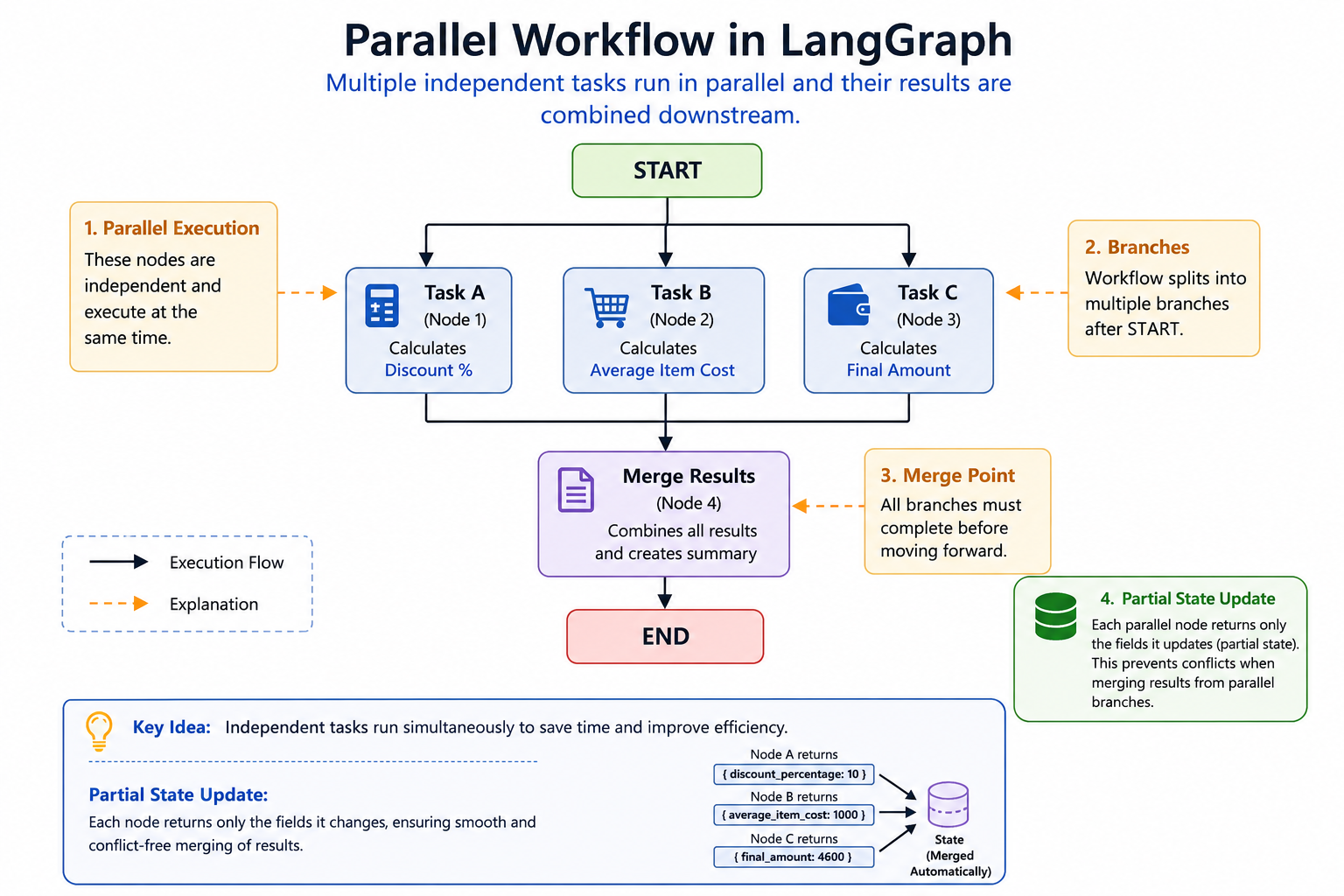
Unlike a sequential workflow, execution branches into multiple paths immediately after the start node. Each branch performs its own task independently. Once all branches finish execution, the results are gathered and passed to a summary node that combines the information. This branching and merging behavior is the essence of parallel execution.
Designing the State
Every LangGraph workflow revolves around a shared state object. The state acts as a container that carries information between nodes.
For our example, we can define the state as follows:
from typing import TypedDict

class OrderAnalyticsState(TypedDict):
    order_amount: float
    discount_amount: float
    item_count: int
    shipping_charge: float

    discount_percentage: float
    average_item_cost: float
    final_payable_amount: float

    summary: str
The first set of fields represents the input data. The second set represents values that will be calculated by the workflow. As the workflow progresses, nodes read information from the state and add new values back into it.
Creating the Graph
Once the state is defined, we can create a graph.
from langgraph.graph import StateGraph

graph = StateGraph(OrderAnalyticsState)
Next, we define the nodes.
graph.add_node(
    "calculate_discount_percentage",
    calculate_discount_percentage
)

graph.add_node(
    "calculate_average_item_cost",
    calculate_average_item_cost
)

graph.add_node(
    "calculate_final_amount",
    calculate_final_amount
)

graph.add_node(
    "generate_summary",
    generate_summary
)
At this stage, we have only defined the building blocks. The workflow behavior will be determined by how these nodes are connected.
Implementing the Parallel Nodes
Let us begin with the discount percentage calculation.
def calculate_discount_percentage(state):
    discount_percentage = (
        state["discount_amount"]
        / state["order_amount"]
    ) * 100

    return {
        "discount_percentage":
        discount_percentage
    }
Next, calculate the average cost per item.
def calculate_average_item_cost(state):
    average_item_cost = (
        state["order_amount"]
        / state["item_count"]
    )

    return {
        "average_item_cost":
        average_item_cost
    }
Finally, calculate the final payable amount.
def calculate_final_amount(state):
    final_amount = (
        state["order_amount"]
        - state["discount_amount"]
        + state["shipping_charge"]
    )

    return {
        "final_payable_amount":
        final_amount
    }
Each node performs a single responsibility and returns only the value it calculates. This design decision will become very important later when we discuss state conflicts.
Creating the Summary Node
After all parallel calculations have completed, we need a node that combines their outputs.
def generate_summary(state):

    summary = f"""
Discount Percentage:
{state['discount_percentage']:.2f}%

Average Item Cost:
₹{state['average_item_cost']:.2f}

Final Amount:
₹{state['final_payable_amount']:.2f}
"""

    return {
        "summary": summary
    }
The summary node gathers information produced by the parallel nodes and creates a human-readable report.
Connecting the Nodes
Now comes the most interesting part. To create parallel execution, we connect the START node to multiple nodes.
graph.add_edge(
    START,
    "calculate_discount_percentage"
)

graph.add_edge(
    START,
    "calculate_average_item_cost"
)

graph.add_edge(
    START,
    "calculate_final_amount"
)
These three edges indicate that all three nodes should begin execution when the workflow starts. Next, we connect the parallel nodes to the summary node.
graph.add_edge(
    "calculate_discount_percentage",
    "generate_summary"
)

graph.add_edge(
    "calculate_average_item_cost",
    "generate_summary"
)

graph.add_edge(
    "calculate_final_amount",
    "generate_summary"
)
Finally:
graph.add_edge(
    "generate_summary",
    END
)
The graph is now complete.
Executing the Workflow
Compile the graph:
workflow = graph.compile()
Create the initial state:
initial_state = {
    "order_amount": 5000,
    "discount_amount": 500,
    "item_count": 5,
    "shipping_charge": 100
}
Execute the workflow:
result = workflow.invoke(
    initial_state
)

print(result)
The workflow will execute all three calculation nodes in parallel and then pass their outputs to the summary node.
The Most Common Mistake in Parallel Workflows
When developers first build parallel workflows, they often encounter a confusing error.
Consider the following implementation:
def calculate_discount_percentage(
        state):

    state["discount_percentage"] = (
        state["discount_amount"]
        / state["order_amount"]
    ) * 100

    return state
At first glance, this looks perfectly reasonable. After all, it works in many sequential workflows. However, in a parallel workflow, this can cause problems.
Why?
Because every parallel node is now returning the entire state.
Imagine three nodes executing simultaneously:
Node A → returns entire state
Node B → returns entire state
Node C → returns entire state
From LangGraph's perspective, all three nodes appear to be updating every field in the state. Even if a field was never modified, LangGraph cannot safely assume that.
This creates ambiguity.
Which version of the state should be trusted?
Which node produced the correct value?
To avoid potential conflicts, LangGraph throws an error.
Understanding Partial State Updates
The solution is simple. Instead of returning the entire state, return only the fields that were updated.
For example:
return {
    "discount_percentage":
    discount_percentage
}
This approach is known as a partial state update. The node is explicitly telling LangGraph: I only modified this specific field. Since each parallel node updates a different field, LangGraph can safely merge the results. This eliminates conflicts and allows the workflow to execute correctly.
Why Partial State Updates Are a Best Practice
Even in workflows where returning the entire state might work, partial updates offer several advantages.
- They make node responsibilities clearer.
- They reduce unnecessary state transfers.
- They prevent parallel execution conflicts.
- They improve maintainability.
Most importantly, they create a consistent pattern that works in both sequential and parallel workflows. For this reason, many experienced LangGraph developers use partial state updates everywhere.
Real-World Applications of Parallel Workflows
Parallel workflows are extremely common in AI and enterprise applications.
Some examples include:
Document Analysis
A document can be analyzed simultaneously for:
- Sentiment
- Key topics
- Risk indicators
- Compliance issues
Customer Feedback Evaluation
Multiple nodes can independently evaluate:
- Product quality feedback
- Delivery experience
- Support quality
AI Content Review
An article can be reviewed simultaneously for:
- Grammar
- Clarity
- Factual accuracy
- Tone
Business Analytics
Sales data can be processed simultaneously to calculate:
- Revenue metrics
- Customer metrics
- Product metrics
- Regional metrics
In all these cases, parallel execution reduces overall processing time and improves workflow efficiency.
Complete Program
from typing import TypedDict
from langgraph.graph import StateGraph, START, END


# ---------------------------------------------------
# State Definition
# ---------------------------------------------------

class OrderAnalyticsState(TypedDict, total=False):
    order_amount: float
    discount_amount: float
    item_count: int
    shipping_charge: float

    discount_percentage: float
    average_item_cost: float
    final_payable_amount: float

    summary: str


# ---------------------------------------------------
# Parallel Node 1
# ---------------------------------------------------

def calculate_discount_percentage(
        state: OrderAnalyticsState):

    discount_percentage = (
        state["discount_amount"]
        / state["order_amount"]
    ) * 100

    print("Executing: calculate_discount_percentage")

    return {
        "discount_percentage":
            discount_percentage
    }


# ---------------------------------------------------
# Parallel Node 2
# ---------------------------------------------------

def calculate_average_item_cost(
        state: OrderAnalyticsState):

    average_item_cost = (
        state["order_amount"]
        / state["item_count"]
    )

    print("Executing: calculate_average_item_cost")

    return {
        "average_item_cost":
            average_item_cost
    }


# ---------------------------------------------------
# Parallel Node 3
# ---------------------------------------------------

def calculate_final_amount(
        state: OrderAnalyticsState):

    final_amount = (
        state["order_amount"]
        - state["discount_amount"]
        + state["shipping_charge"]
    )

    print("Executing: calculate_final_amount")

    return {
        "final_payable_amount":
            final_amount
    }


# ---------------------------------------------------
# Merge Node
# ---------------------------------------------------

def generate_summary(
        state: OrderAnalyticsState):

    print("Executing: generate_summary")

    summary = f"""
Order Analytics Summary
-----------------------
Discount Percentage : {state['discount_percentage']:.2f}%
Average Item Cost   : ₹{state['average_item_cost']:.2f}
Final Amount        : ₹{state['final_payable_amount']:.2f}
"""

    return {
        "summary": summary
    }


# ---------------------------------------------------
# Create Graph
# ---------------------------------------------------

graph = StateGraph(OrderAnalyticsState)


# Register Nodes

graph.add_node(
    "calculate_discount_percentage",
    calculate_discount_percentage
)

graph.add_node(
    "calculate_average_item_cost",
    calculate_average_item_cost
)

graph.add_node(
    "calculate_final_amount",
    calculate_final_amount
)

graph.add_node(
    "generate_summary",
    generate_summary
)


# ---------------------------------------------------
# Parallel Branches
# ---------------------------------------------------

graph.add_edge(
    START,
    "calculate_discount_percentage"
)

graph.add_edge(
    START,
    "calculate_average_item_cost"
)

graph.add_edge(
    START,
    "calculate_final_amount"
)


# ---------------------------------------------------
# Merge Point
# ---------------------------------------------------

graph.add_edge(
    "calculate_discount_percentage",
    "generate_summary"
)

graph.add_edge(
    "calculate_average_item_cost",
    "generate_summary"
)

graph.add_edge(
    "calculate_final_amount",
    "generate_summary"
)


# ---------------------------------------------------
# End
# ---------------------------------------------------

graph.add_edge(
    "generate_summary",
    END
)


# ---------------------------------------------------
# Compile Workflow
# ---------------------------------------------------

workflow = graph.compile()


# ---------------------------------------------------
# Input
# ---------------------------------------------------

initial_state = {
    "order_amount": 5000,
    "discount_amount": 500,
    "item_count": 5,
    "shipping_charge": 100
}


# ---------------------------------------------------
# Execute
# ---------------------------------------------------

result = workflow.invoke(
    initial_state
)


# ---------------------------------------------------
# Output
# ---------------------------------------------------

print("\nFinal State")
print("=" * 50)

for key, value in result.items():
    print(f"{key}: {value}")

print("\nSummary")
print("=" * 50)
print(result["summary"])
Summary
Parallel workflows allow multiple independent tasks to execute simultaneously instead of one after another. They are particularly useful when several operations can be performed using the same input data without depending on each other's outputs.
In LangGraph, parallel execution is achieved by connecting multiple nodes to the same parent node and later merging their outputs through a common node.
The most important lesson from this tutorial is understanding state management. Returning the entire state from multiple parallel nodes can lead to conflicts because LangGraph cannot determine which updates should be applied. The recommended solution is to use partial state updates, where each node returns only the fields it modifies.
Once you understand this pattern, you can confidently build more advanced workflows involving reducers, structured outputs, multiple LLM calls, and complex agentic systems.