Building Iterative Workflows In LangGraph
Understanding Repetitive Execution in AI Workflows
In the previous tutorials, we explored three fundamental workflow patterns in LangGraph.
The first pattern was the linear workflow, where every node executes in a fixed sequence. Regardless of the input, the execution path remains the same, making this pattern suitable for predictable processes.
Next, we learned about conditional workflows, where the workflow examines the current state and dynamically chooses the next node. Instead of following a single predefined path, the graph can make decisions while it is running.
Finally, we explored parallel workflows, which allow multiple nodes to execute simultaneously. Parallel execution improves efficiency when several independent tasks can be performed at the same time.
Although these three workflow patterns solve many problems, they all have one important characteristic in common.
Every node is executed only once. Once the workflow moves past a node, it never returns to it. For many real-world AI applications, however, this is not enough. Sometimes the first answer produced by an AI model is incomplete. Sometimes additional information must be gathered before making a decision. Sometimes a generated response must be reviewed and improved several times before it reaches an acceptable quality.
In situations like these, the workflow cannot simply move forward until it reaches the END node. Instead, it must repeat certain steps until a particular condition is satisfied.
This type of workflow is known as an iterative workflow. Unlike linear, conditional, or parallel workflows, an iterative workflow allows the graph to revisit previously executed nodes. The workflow continues looping through the same sequence of operations until it determines that no further improvements or repetitions are required.
This ability to repeat work is one of the reasons LangGraph is well suited for building intelligent AI agents that can refine their outputs, recover from failures, or continue searching until they have enough information to complete a task.
Why Do We Need Iterative Workflows?
Let's begin with a simple example.
Suppose you are building an AI writing assistant. A user asks the assistant to generate a professional email. The workflow could simply generate the email and return it immediately.
START
   │
   ▼
Generate Email
   │
   ▼
END
This is a perfectly valid linear workflow. However, is the first draft always the best draft? Probably not.
The email may contain grammatical mistakes, awkward wording, or missing information. Rather than immediately returning the first draft, it would be better if the AI reviewed its own work and improved it before presenting the final result. Conceptually, the workflow would look like this.
START
   │
   ▼
Generate Draft
   │
   ▼
Review Draft
   │
   ▼
Good Enough?
Now the workflow faces a decision. If the draft is satisfactory, the workflow can finish. If the draft still requires improvement, it should be revised and reviewed again.
Generate Draft
      │
      ▼
Review Draft
      │
      ▼
Good Enough?
 ┌──────┴──────┐
 │             │
No            Yes
 │             │
 ▼             ▼
Improve       END
 │
 └──────────────► Review Draft
Notice something important. The workflow returns to a node that has already been executed. This is fundamentally different from the workflow patterns we studied earlier. Instead of continuously moving forward, the workflow revisits earlier steps until the desired result is achieved. That repeated execution is what makes the workflow iterative.
Linear vs Conditional vs Parallel vs Iterative Workflows
Now that we've studied four workflow patterns, it's helpful to compare them side by side.
| Workflow Type | Purpose |
|---|---|
| Linear | Execute nodes in a fixed sequence. |
| Conditional | Dynamically choose one execution path. |
| Parallel | Execute multiple independent branches simultaneously. |
| Iterative | Repeat one or more nodes until a stopping condition is satisfied. |
Although all four patterns are built using LangGraph, they solve different types of problems.
- A linear workflow is appropriate when every request requires exactly the same sequence of operations.
- A conditional workflow becomes useful when different inputs require different execution paths.
- A parallel workflow improves performance by allowing independent tasks to execute concurrently.
An iterative workflow is different from all three. Its purpose is not to choose another path or execute more nodes simultaneously. Instead, its purpose is to repeat work until the workflow reaches an acceptable result.
This distinction is important because many real-world AI systems combine these patterns. A workflow may make a routing decision, execute several tasks in parallel, and then repeat the entire process if the generated result is not yet satisfactory.
What Exactly Is an Iterative Workflow?
An iterative workflow is a workflow that repeatedly executes one or more nodes until a stopping condition becomes true. The stopping condition determines whether the workflow should continue or terminate.
Unlike a traditional Python loop, where the same block of code executes repeatedly, an iterative workflow repeats an entire sequence of graph nodes.
For example, consider the following workflow.
Generate
    │
    ▼
Review
    │
    ▼
Improve
    │
    ▼
Review
    │
    ▼
Improve
Although the Review node executes multiple times, each execution is part of the graph's normal traversal.
The workflow simply revisits the same nodes until the review determines that the result is good enough.
From LangGraph's perspective, this repetition is achieved by connecting nodes in a way that forms a cycle within the graph.
Instead of always moving forward, the graph can revisit an earlier node and continue execution from there.
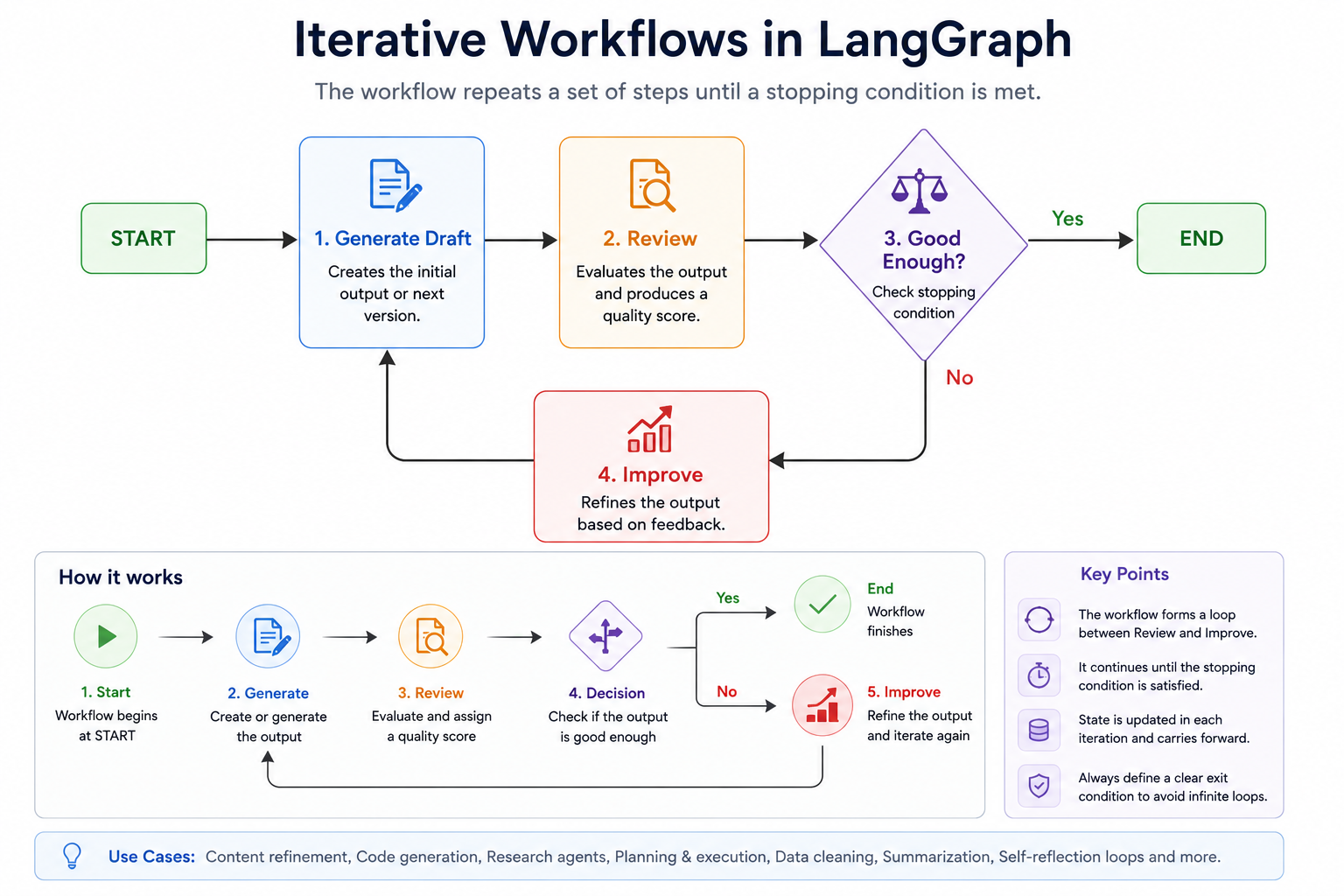
The Components of an Iterative Workflow
Every iterative workflow contains a few common components.
- The first component is the worker node. This node performs the primary task, such as generating text, writing code, searching the web, or summarizing a document.
- Next comes the evaluation node. Its responsibility is to determine whether the current result is satisfactory. The evaluation may be based on simple rules, a machine learning model, or another LLM.
- The third component is the stopping condition. This determines whether the workflow should continue iterating or terminate. If the stopping condition evaluates to false, the workflow returns to an earlier node and repeats part of the process. If the stopping condition evaluates to true, the workflow proceeds to the END node.
- Finally, the workflow state stores all the information required across multiple iterations. Unlike linear workflows, where each node is usually executed once, iterative workflows often need to remember values such as the current draft, the quality score, the number of iterations completed, or feedback generated during previous cycles.
Together, these components allow the workflow to improve its output incrementally rather than relying on a single execution.
Why Are Iterative Workflows So Important for AI Agents?
Human beings rarely produce perfect work on the first attempt. When writing an article, we draft, review, edit, and refine it several times before considering it complete. Software developers compile their code, inspect compiler errors, fix the problems, and compile again. Researchers gather information, evaluate whether they have enough evidence, and continue searching if necessary.
Modern AI agents follow the same philosophy.
Instead of assuming that the first response is always correct, they repeatedly evaluate their own work and improve it whenever necessary. This ability to generate, evaluate, and refine is one of the defining characteristics of advanced AI systems. Many sophisticated agent architectures—including planning agents, self-reflection agents, autonomous coding assistants, and research agents—rely heavily on iterative execution. Without the ability to revisit earlier steps, these systems would be limited to producing a single attempt, regardless of its quality. By allowing workflows to repeat selected portions of the graph, LangGraph enables AI applications to behave in a much more adaptive and human-like manner.
Building Your First Iterative Workflow
Although the concept is simple, understanding how iteration is implemented in LangGraph requires a slightly different way of thinking.
LangGraph does not provide a traditional while or for loop.
Instead, iteration is created by connecting graph nodes in a way that allows execution to return to an earlier node. In other words, the graph itself contains a cycle.
In this tutorial, we'll build a complete iterative workflow from scratch and examine how LangGraph repeatedly traverses the same nodes until the stopping condition is satisfied.
The Workflow We Are Going to Build
Suppose we are building an AI assistant that generates a short article. Rather than immediately accepting the first draft, we want the workflow to review the generated content. If the quality score is too low, the article should be improved and reviewed again. The process continues until the article reaches an acceptable quality score. Conceptually, our workflow looks like this.
                START
                   │
                   ▼
           Generate Draft
                   │
                   ▼
            Review Draft
                   │
                   ▼
          Quality Good Enough?
             ┌────────────┐
        No   │            │ Yes
             ▼            ▼
      Improve Draft      END
             │
             └────────────►
                 Review Draft
Notice that the workflow contains a loop.
Instead of always moving forward, the Improve Draft node sends the workflow back to the Review Draft node. This repeated execution continues until the reviewer decides that the draft has reached the required quality.
Complete Program
Let's begin by looking at the complete implementation.
Don't worry if every part isn't immediately clear. We'll break down the program section by section throughout the rest of this tutorial.
from typing_extensions import TypedDict
from langgraph.graph import StateGraph, START, END


class DraftState(TypedDict):
    draft: str
    quality_score: int
    iteration: int


# -------------------------------------------------
# Generate the initial draft
# -------------------------------------------------

def generate_draft(state: DraftState):

    print("\nGenerating initial draft...")

    return {
        "draft": "Artificial Intelligence is transforming many industries.",
        "iteration": 1
    }


# -------------------------------------------------
# Review the draft
# -------------------------------------------------

def review_draft(state: DraftState):

    print(f"Reviewing draft (Iteration {state['iteration']})")

    score = state["iteration"] * 40

    if score > 100:
        score = 100

    print(f"Quality Score : {score}")

    return {
        "quality_score": score
    }


# -------------------------------------------------
# Improve the draft
# -------------------------------------------------

def improve_draft(state: DraftState):

    print("Improving the draft...")

    return {
        "draft": state["draft"] + " Additional improvements were made.",
        "iteration": state["iteration"] + 1
    }


# -------------------------------------------------
# Router
# -------------------------------------------------

def should_continue(state: DraftState):

    if state["quality_score"] >= 80:
        return "finish"

    return "improve"


builder = StateGraph(DraftState)

builder.add_node("generate", generate_draft)
builder.add_node("review", review_draft)
builder.add_node("improve", improve_draft)


builder.add_edge(START, "generate")
builder.add_edge("generate", "review")

builder.add_conditional_edges(
    "review",
    should_continue,
    {
        "improve": "improve",
        "finish": END
    }
)

builder.add_edge("improve", "review")

graph = builder.compile()


initial_state = {
    "draft": "",
    "quality_score": 0,
    "iteration": 0
}

result = graph.invoke(initial_state)

print("\nFinal State")
print(result)
Sample Output
One possible execution is shown below.
Generating initial draft...

Reviewing draft (Iteration 1)
Quality Score : 40

Improving the draft...

Reviewing draft (Iteration 2)
Quality Score : 80

Final State
{
    'draft': 'Artificial Intelligence is transforming many industries. Additional improvements were made.',
    'quality_score': 80,
    'iteration': 2
}
Notice something interesting.
The review_draft() node executes twice. The improve_draft() node also executes once before the workflow finally reaches the END node.
This repeated execution is what makes the workflow iterative.
Understanding the Workflow State
Like every LangGraph application, our workflow begins with a shared state.
class DraftState(TypedDict):
    draft: str
    quality_score: int
    iteration: int
The draft field stores the current version of the article being refined. Unlike a linear workflow, this value changes over multiple iterations as the workflow improves the content.
The quality_score field represents the result of the review step. After each review, the workflow records a score that indicates how good the current draft is.
Finally, the iteration field keeps track of how many refinement cycles have been completed. This field isn't strictly required for every iterative workflow, but it is extremely useful because it allows the workflow to monitor its progress and helps prevent infinite loops.
One of the key differences between iterative and linear workflows is that the state evolves over multiple passes through the graph. Rather than flowing through the graph once, the same state is updated repeatedly as the workflow revisits earlier nodes.
Generating the Initial Draft
The first node executed by the workflow is generate_draft().
def generate_draft(state: DraftState):

    return {
        "draft": "Artificial Intelligence is transforming many industries.",
        "iteration": 1
    }
This node initializes the workflow by creating the first version of the article. It also sets the iteration count to 1, indicating that the workflow has completed its first generation step.
In a production AI application, this node would likely invoke an LLM to generate content. For this tutorial, we simply return a fixed string so that we can focus entirely on understanding the workflow mechanics.
Reviewing the Draft
The next node evaluates the quality of the generated article.
def review_draft(state: DraftState):

    score = state["iteration"] * 40

    return {
        "quality_score": score
    }
To keep the example simple, we calculate the quality score using the current iteration count. Each time the workflow loops, the score increases until it reaches the required threshold.
Although this scoring mechanism is artificial, it clearly demonstrates how the review node updates the state after every iteration.
In real-world systems, this node could perform grammar checking, evaluate factual correctness, measure confidence, or ask another LLM to review the generated content.
Improving the Draft
If the review determines that the quality is not yet sufficient, the workflow executes the improve_draft() node.
def improve_draft(state: DraftState):

    return {
        "draft": state["draft"] + " Additional improvements were made.",
        "iteration": state["iteration"] + 1
    }
This node modifies the existing draft and increments the iteration count. Each time it executes, the workflow becomes one step closer to satisfying the stopping condition.
Notice that the node updates only the fields that it is responsible for. The quality_score remains unchanged until the next review cycle.
The Router Function
After every review, the workflow must decide whether another iteration is required. This decision is handled by the router function.
def should_continue(state: DraftState):

    if state["quality_score"] >= 80:
        return "finish"

    return "improve"
The router examines the current quality score and returns one of two possible routes. If the score has reached the required threshold, the router returns "finish".
Otherwise, it returns "improve".
Notice that the router does not perform the improvement itself. Just as we learned in the conditional workflow tutorial, its only responsibility is to decide where the workflow should go next.
Creating the Iteration
The most important part of this workflow is the graph structure itself. First, we connect the START node to the draft generator.
builder.add_edge(START, "generate")
The generated draft is then passed to the review node.
builder.add_edge("generate", "review")
At this point, the workflow pauses and asks the router to decide what should happen next.
builder.add_conditional_edges(
    "review",
    should_continue,
    {
        "improve": "improve",
        "finish": END
    }
)
If the router returns "finish", the workflow terminates. If it returns "improve", execution continues with the improve node.
Finally, we connect the improvement node back to the reviewer.
builder.add_edge("improve", "review")
This single edge is what transforms the workflow into an iterative workflow. Instead of always moving toward the END node, the graph now contains a cycle. As long as the stopping condition is not satisfied, the workflow continues traversing the loop.
Building Robust Iterative Workflows
In the previous tutorial, we built our first iterative workflow in LangGraph. The workflow repeatedly generated, reviewed, and improved a draft until the review score reached an acceptable threshold.
Although the example was intentionally simple, it introduced one of the most powerful features of LangGraph—the ability to revisit previously executed nodes and continue processing until a goal is achieved. However, our example also raises several important questions.
- What happens if the review score never reaches the required threshold?
- Can the workflow continue forever?
- How do real AI agents decide when to stop iterating?
- How can we prevent workflows from getting stuck in an endless loop?
These are important questions because iterative workflows introduce a challenge that linear and conditional workflows do not have.
Whenever a workflow contains a cycle, there is always the possibility that it may never reach the END node.
In this tutorial, we'll explore how to design iterative workflows that are both reliable and safe for production use.
The Danger of Infinite Loops
The greatest risk associated with iterative workflows is the possibility of an infinite loop.
Unlike a Python program, where an infinite loop typically consumes CPU resources, an AI workflow may repeatedly call large language models, external APIs, databases, or search engines. Each additional iteration increases execution time, consumes computational resources, and may incur additional cost.
For this reason, every production-quality iterative workflow should include one or more mechanisms that guarantee the workflow will eventually terminate.
Using a Maximum Iteration Count
One of the simplest safeguards is limiting the number of iterations. Suppose we decide that the workflow should never execute more than five review cycles. Instead of checking only the quality score, the router can also examine the iteration count stored in the workflow state.
Conceptually, the router's decision becomes:
if state["iteration"] >= 5:
    return "finish"

if state["quality_score"] >= 80:
    return "finish"

return "improve"
Now the workflow has two independent stopping conditions. The first condition checks whether the desired quality has been achieved. The second condition prevents the workflow from running forever. Even if the review score never reaches 80, the workflow will still terminate after the fifth iteration. This simple safeguard dramatically improves the reliability of iterative workflows.
Why Store the Iteration Count in the State?
In our previous example, the workflow state contained an iteration field.
class DraftState(TypedDict):
    draft: str
    quality_score: int
    iteration: int
At first, this field seemed useful only for displaying progress. However, it serves a much more important purpose. The workflow state persists across multiple iterations. Every time the workflow loops back to an earlier node, the updated state is passed along with it. As a result, the iteration counter continues increasing throughout the execution.
Without storing the iteration count in the shared state, the workflow would have no reliable way of knowing how many times it had already executed.
Maintaining this information inside the state also makes debugging much easier because every execution carries its own history.
Multiple Stopping Conditions
Production workflows rarely rely on a single stopping condition. Instead, several conditions are often evaluated together.
For example, an AI writing assistant may stop refining a document when any of the following conditions becomes true:
- The quality score exceeds 90.
- The maximum number of iterations has been reached.
- The user manually approves the draft.
- The reviewer reports that no further improvements are possible.
Conceptually, the workflow becomes:
Review Draft
      │
      ▼
Should Stop?
 ┌──────────────┐
 │ Quality ≥ 90 │
 │ OR           │
 │ Iteration=5  │
 │ OR           │
 │ User Approved│
 └──────┬───────┘
        │
   Yes ─┴─ No
Using multiple stopping conditions makes workflows significantly more robust because they no longer depend on a single measurement.
Human-in-the-Loop Iteration
Not every review needs to be performed by an AI model. Many production systems involve human reviewers.
Imagine an AI that generates legal documents. Instead of automatically approving the document once it reaches a certain score, the workflow could pause and wait for a human lawyer to review it. If the reviewer requests changes, the workflow performs another iteration. If the reviewer approves the document, execution proceeds to the END node.
This combination of automated refinement and human oversight is common in applications where accuracy is especially important.